No capacity, no pipelines, no automation, and it works. The limit is human error: sooner or later somebody publishes to the wrong workspace.
Who it fits
- Power BI only: no lakehouses, notebooks, warehouses or data pipelines
- Pro licences, and no budget for a Fabric capacity
- One or two people building
- A real need for a production environment the business reads from
Three workspaces, named so the environment is unmissable
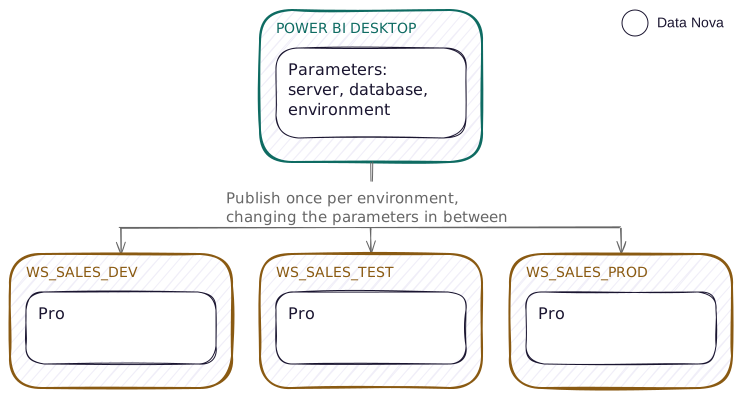
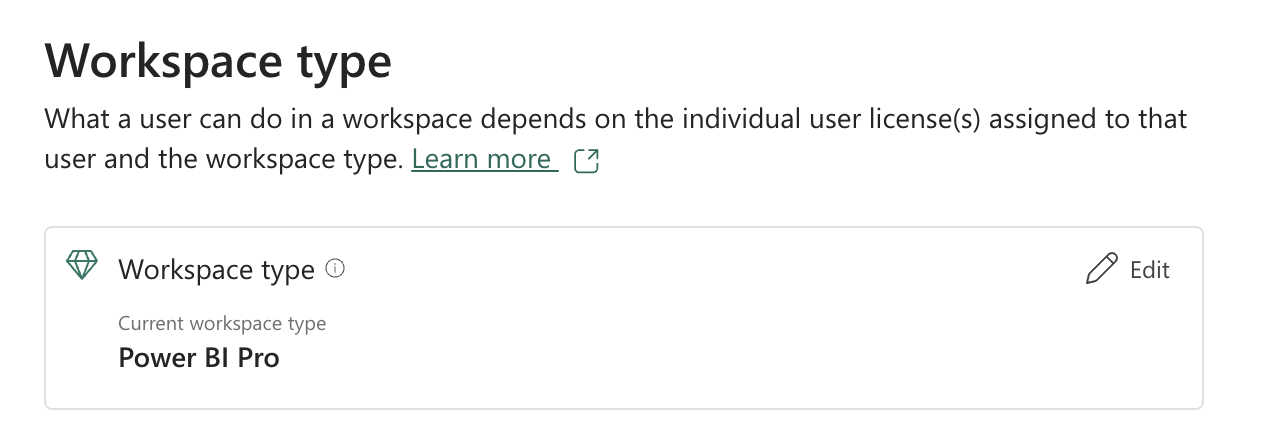
Three workspaces, all Power BI Pro. From Power BI Desktop, publishing to the wrong workspace is an easy mistake to make, so putting the environment in the workspace name helps avoid it.
Use a suffix, not a prefix, to signal the workspace environment. The Fabric workspace list sorts alphabetically, so a suffix keeps one project's three workspaces together. A prefix splits them: DEV_WS_Sales sorts beside every other Dev workspace in the tenant, nowhere near its own Test and Prod.
That is deliberately the opposite of the item rule in the naming guide, where ENV is a prefix and is used only where items from more than one environment sit side by side. These are different problems. There you are scanning a list of items inside one workspace, and the environment is the exception worth flagging first. Here you are scanning a list of workspaces, and the environment is the whole reason there are three of them, so it goes last, and the three workspaces sort together in the list.
WS_Sales_Dev
WS_Sales_Test
WS_Sales_Prod
Access is set by workspace role, never by sharing individual items.
| Workspace | Admin | Member | Contributor | Viewer |
|---|---|---|---|---|
| Dev | Lead | Builders | None | None |
| Test | Lead | None | Builders | Testers and business reviewers |
| Prod | Lead, and one other named person | None | None | None |
Builders drop from Member in Dev to Contributor in Test on purpose. A Member can add other people to the workspace; a Contributor cannot. So Dev stays self-service for the people building in it, and the guest list for Test stays with the Lead.
Two Admins in production, not one. A single Admin is this pattern's other single point of failure, next to the runbook: while that person is away the app cannot be updated, a failed refresh cannot be fixed and access cannot be granted. It is the same instinct as having someone other than the author review in Test, applied to who holds the keys.
Parameters are the whole mechanism
There is no pipeline here to apply rules, so the environment has to be carried in the file you publish. Define it in Power Query parameters and change their values before each publish.
| Parameter | Dev | Test | Prod |
|---|---|---|---|
pServer | sql-dev.database.windows.net | sql-test… | sql-prod… |
pDatabase | Sales_Dev | Sales_Test | Sales |
pEnvironment | DEV | TEST | PROD |
pEnvironment, in the corner of the report, visible in Dev and Test and hidden or recoloured in Prod. It sounds trivial. It is the cheapest protection you will ever build against the two failure modes of this pattern: publishing Dev content to Prod, and testing against Prod data while believing you are in Test.The promotion runbook
Write this down somewhere your team reads, because in this pattern the runbook is the deployment tool.
- Build and check in Dev.
- Change the parameter values in Desktop to Test.
- Publish to
WS_Sales_Test, replacing the existing item. - In the service, set the credentials on the semantic model. They do not travel with the file.
- Refresh, and confirm the environment card says TEST and a known value matches Test's expected number.
- Have someone other than the author review it in Test.
- Repeat steps 2 to 5 for Prod.
- Update the app from the Prod workspace.
The same runbook as a picture. Steps two to five happen twice, which is where this pattern costs you.
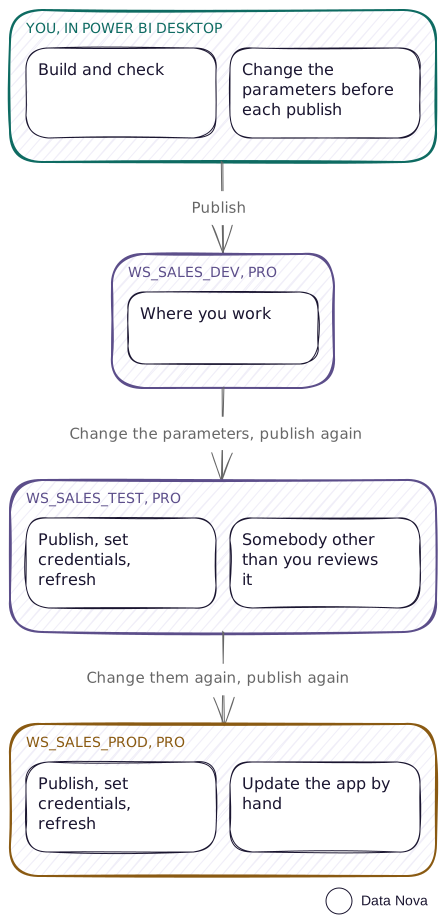
The way out is to publish the model and the report as one file per environment, or to repoint each report in the service after publishing, once per report per environment. Both are work that grows with the number of reports, and it is the clearest single reason teams move to deployment pipelines, which do the repointing for you.
Keep the file in source control anyway. Git integration needs capacity, but a plain repository does not. Committing the file gives you the one thing this pattern otherwise completely lacks: the ability to answer what it looked like last month. Save as .pbip rather than .pbix so the diffs are readable text instead of a binary blob.
If a repository is more than you want, save the file to OneDrive or SharePoint and work from there. You get version history without setting anything up, which is most of what this pattern is missing, and Power BI Desktop opens and saves to it directly. Microsoft documents the setup in Power BI Desktop OneDrive and SharePoint integration(opens in a new tab).
What it costs
A Pro licence for every builder and every viewer. That is the real cost of this pattern, and once a report goes to hundreds of people or to the whole organisation, F64 plus free viewer licences can come out cheaper than Pro for everyone.
Work it out for your own estate instead of trusting that threshold, because two things move it a long way. If your organisation already holds Microsoft 365 E5, which includes Power BI Pro, the per-viewer cost is already paid, and the crossover sits much further out than a list price suggests. And in practice what moves an organisation onto capacity is often not the licence bill at all, but something Pro cannot do.
What breaks
- The shared-capacity limits. Eight scheduled refreshes a day, with the quota resetting at 12:01 AM local time. Two hours maximum refresh duration, and past that the model is simply not refreshable here. A 1 GB semantic model ceiling. These three are Microsoft's documented limits. Checking them yourself would need a wall-clock day, a model that runs for two hours, and a model that large.
- No XMLA endpoint, so no external tools writing to the model, no Tabular Editor deployment and no partition-level refresh.
- No audit trail. Nobody can tell you who published what, when, or from which file.
- Step 4 gets skipped. Someone publishes, does not set credentials, and the refresh fails quietly overnight.
When this breaks down
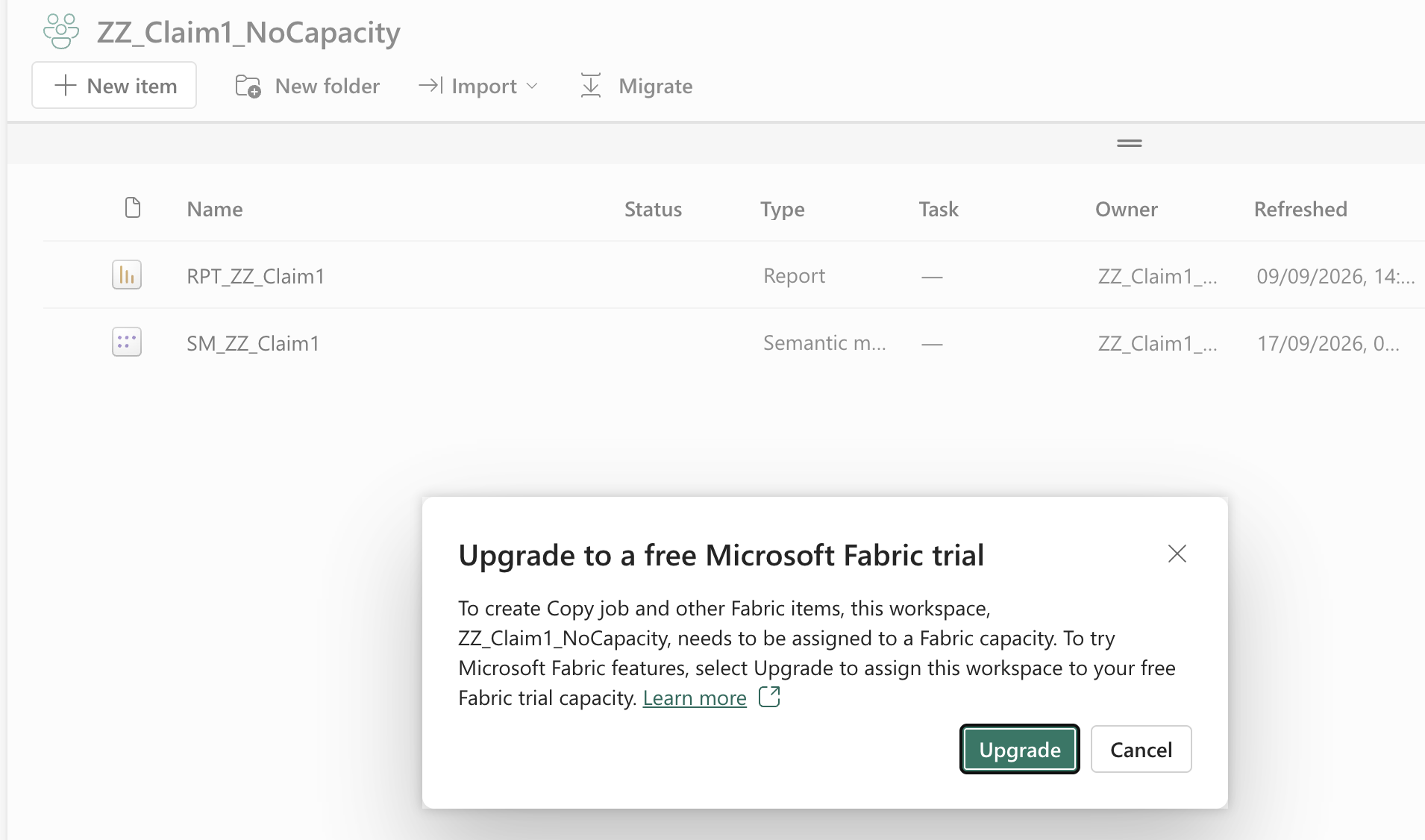
- You need a lakehouse, a notebook, a warehouse or a data pipeline. Those need an F capacity, and Premium Per User will not do it: PPU gives you Premium Power BI features, not a Fabric capacity. You will not get an error telling you so, and the option is not hidden either. New item is right there in a Pro workspace and it will let you choose a Fabric item. What comes back is a dialog offering to upgrade the workspace to a free Fabric trial capacity, because that is what creating one would take. Accept it and you are on a 60 day clock: useful for proving something, and no basis for a cutover date.
- The manual runbook has been skipped enough times that you no longer trust production.
- Two people need to build at the same time.
- Your viewer count has made per-viewer Pro licensing more expensive than a capacity.
Where every environment can go on capacity, capacity and deployment pipelines is the next step. Where only the engineering layer can, it is the mixed estate.