One workspace
You are the only one building, and the only one looking. Fine until somebody else starts making decisions from it.
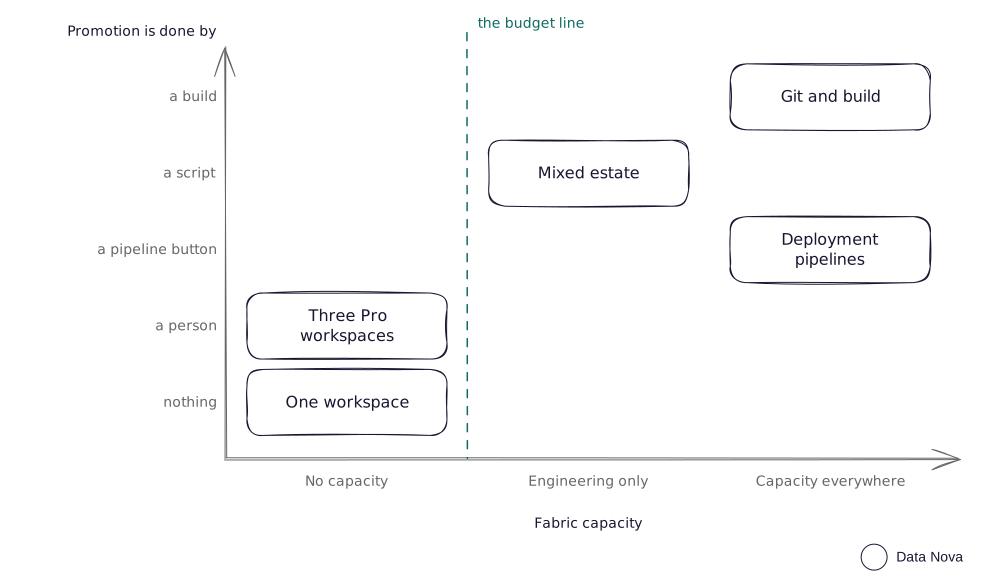
Read the patternFive ways to get your work from where you build it to where the business reads it. Which one you can use is mostly decided already, by whether you have Fabric capacity and whether you need more than Power BI.
Not how big your team is, or how good. Two things: whether anyone has bought Fabric capacity, and whether you need anything beyond Power BI. Both are usually settled before you get a say in them.
The moment that matters is when somebody other than you starts making decisions from your report. Before that, building everything in one workspace is fine. After that, the place people read from cannot be the place you are still working in.
So start from what you already have. Read the pattern next to yours too: each page ends with the signs that you have outgrown it, and says where to go next.
Most teams arrive at this guide asking "git or deployment pipelines?". The question has no answer, because the two are not alternatives. Git stores your work and gives you history and review. It does not move anything into production. The moving is done by a deployment pipeline, or by a build running fabric-cicd(opens in a new tab).
Which is where the word gets slippery, because two different things are called a pipeline. A Fabric deployment pipeline is the Fabric feature that promotes items between workspace stages. An Azure DevOps pipeline runs a build, and the build is what deploys. This guide means the Fabric one unless it says Azure DevOps.
So plenty of teams run both: git on the development workspace for the history, a deployment pipeline to promote from there to test and production.
Four questions, in order. Stop at the first one that sends you somewhere.
| Ask | If the answer is | Read this pattern |
|---|---|---|
| Does anyone other than you depend on these reports? | No, still exploring | One workspace |
| Do you need lakehouses, notebooks, warehouses or data pipelines? | No, Power BI only, and Pro licences only | Three Pro workspaces |
| Can every environment sit on a Fabric capacity? | No, capacity for engineering only | Mixed estate |
| Do you need history, rollback, code review or parallel developers? | Not yet | Deployment pipelines |
| Do you need history, rollback, code review or parallel developers? | Yes, any of them | Git and build |
| One workspace | Pro, manual | Pipelines | Git and build | Mixed estate | |
|---|---|---|---|---|---|
| Fabric capacity needed | None | None | Every stage | Every stage | Engineering only |
| Per-user licences | Pro, one | Pro, everyone | Pro to build, free viewers on F64 and above | Same as pipelines | Pro to view reports |
| Non-Power BI Fabric items | No | No | Yes | Yes | In the capacity half |
| Promotion mechanism | None | Publish from Desktop | Pipeline button or API | A build step from a repository | A notebook over REST |
| History and rollback | No | No | No | Yes | Yes, if the repository drives it |
| Parallel developers | Painful | Painful | Workable | Designed for it | Workable |
| Effort to stand up | None | Half a day | A day | A week or more | A week or more |
| Effort to run | None | High, and error-prone | Low | Low once built | Medium |
| What characteristically goes wrong | Someone reads a half-built change | A publish goes to the wrong workspace | A bad deploy reaches production with no way back | One report changes and everything redeploys | A deploy succeeds against the wrong environment |
You are the only one building, and the only one looking. Fine until somebody else starts making decisions from it.
Read the patternPower BI only, Pro licences, no money for capacity. You move things by republishing from Desktop, so sooner or later someone publishes to the wrong workspace.
Read the patternEvery environment sits on Fabric capacity, and you want a release process without writing code. This is Fabric’s own answer.
Read the patternSeveral people building at once, and somebody will eventually ask who approved a change and what it looked like last week.
Read the patternCapacity for the data engineering, Pro workspaces for the reports. You script the moves yourself, because a deployment pipeline cannot cross that line.
Read the patternFour things hold whichever of the five you land on, and they are the four that cost people the most: what carries your credentials, how you configure per environment, how you tell a deployment worked, and how you keep the environment visible in a name. The seventh page covers them, along with how to move between patterns once you have outgrown one, a checklist to run before you build, and every source behind this guide.
Read what is true in every patternMoving between patterns is much easier to plan than to improvise. Assign three existing workspaces into pipeline stages without first checking how the items pair up, and you get duplicates instead of a release process. If you are weighing two of these against real licences and a real audience, an assessment can test the decision before you build it.
Talk it through