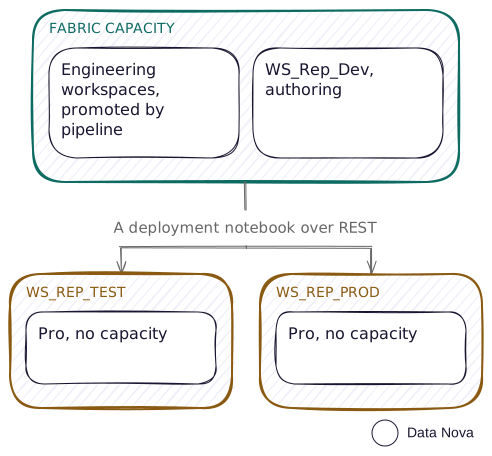
This pattern solves a budget problem rather than an architectural one: an organisation can justify one Fabric capacity for the data platform, but not capacity on six reporting workspaces across three environments. Deployment pipelines require capacity on every stage, so the standard answer does not apply.
Who it fits
- Fabric capacity affordable for the engineering layer, but not for every reporting environment
- A reporting audience small enough that per-viewer Pro licensing still beats F64
- Someone who can write and own a deployment notebook
- Somebody who will run the notebook, or a service principal if you want it running without them
Does it actually work? Yes, with one constraint
The question this pattern turns on is whether item definitions can be deployed into a Pro workspace with no assigned capacity at all. They can.POST /v1/workspaces with capacityId omitted returns a workspace with no capacity, and both a semantic model and a report were created into it through POST /semanticModels and POST /reports, the operations returning Succeeded and the items read back from the service. The model refreshed on a schedule set by API, and PATCH refreshSchedule read back intact.
The one design constraint: a cloud connection must exist per environment. You do not need a service principal for any of this. Open the notebook and run it, and it works against your own account, because a notebook run in Fabric carries the identity of whoever started it. The one thing your account cannot do is create that cloud connection, which stays a portal action you do once per environment. A service principal can create it, and then nobody has to be there at all.
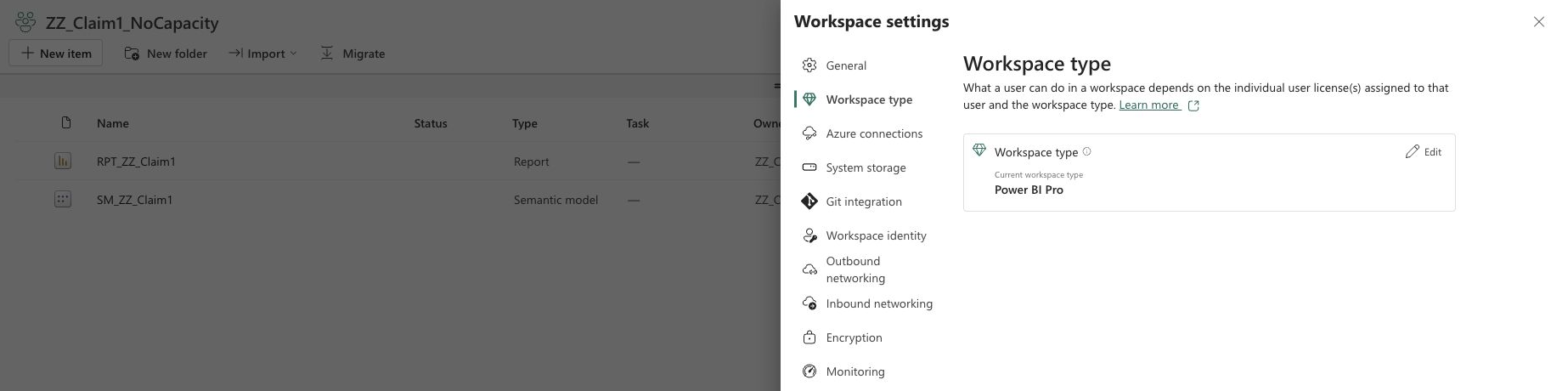
fabric-cicd(opens in a new tab) that publishing into a workspace with no assigned capacity began failing in July 2025 with "Workspace does not have an assigned capacity. Please assign a capacity before publishing items", with no maintainer response. It does not happen now: the workspace was created with capacityId omitted, and a semantic model and a report were both published into it and read back. Re-run it yourself before designing around it, since the pattern has no premise without it.The layering
Engineering items live on capacity and promote with a normal deployment pipeline, because they can. Only the reporting layer, the semantic models and the reports, crosses into Pro workspaces, and only that crossing needs the script. Keep the split clean. The moment a lakehouse or a notebook needs to live in a Pro workspace, this pattern is not what you want: Free and Pro licences cannot run non-Power BI Fabric items outside an F or Trial capacity.
The authoring workspace stays on capacity.WS_Rep_Dev sits on the capacity so authors get the XMLA endpoint, external tools and a git connection. Test and Prod are the Pro ones. This costs nothing extra, since the capacity is already there for engineering.
That git connection is where the reporting layer's history lives, and it is the only workspace of the three that can have one, because git integration needs a capacity. Test and Prod hold a copy of each item, not a version of it, and nothing in them remembers what they held last month.
So rolling back is not something you do in Test or Prod. You take the version you want out of git into Dev, and run the deploy script forward again. If the authoring route is still Power BI Desktop, keep the .pbip somewhere with history as well, for the same reason the one workspace pattern says to.
Put together, a release looks like this. You author, publish and commit in Dev, run the notebook at Test, have somebody look at it, then run the notebook again at Prod and update the app by hand.
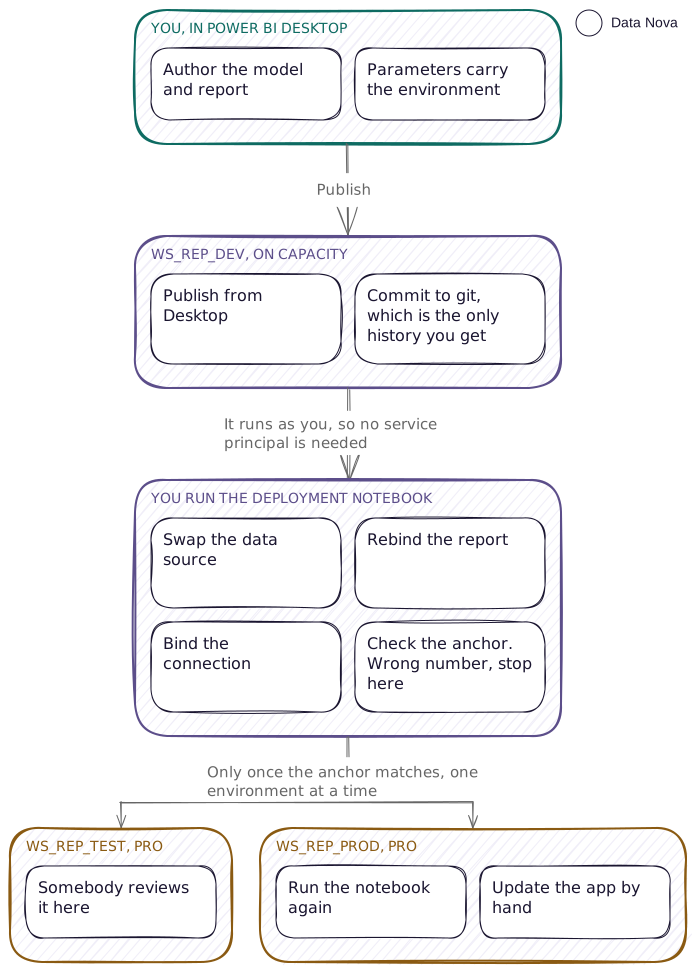
Four things the deploy script must do, in order
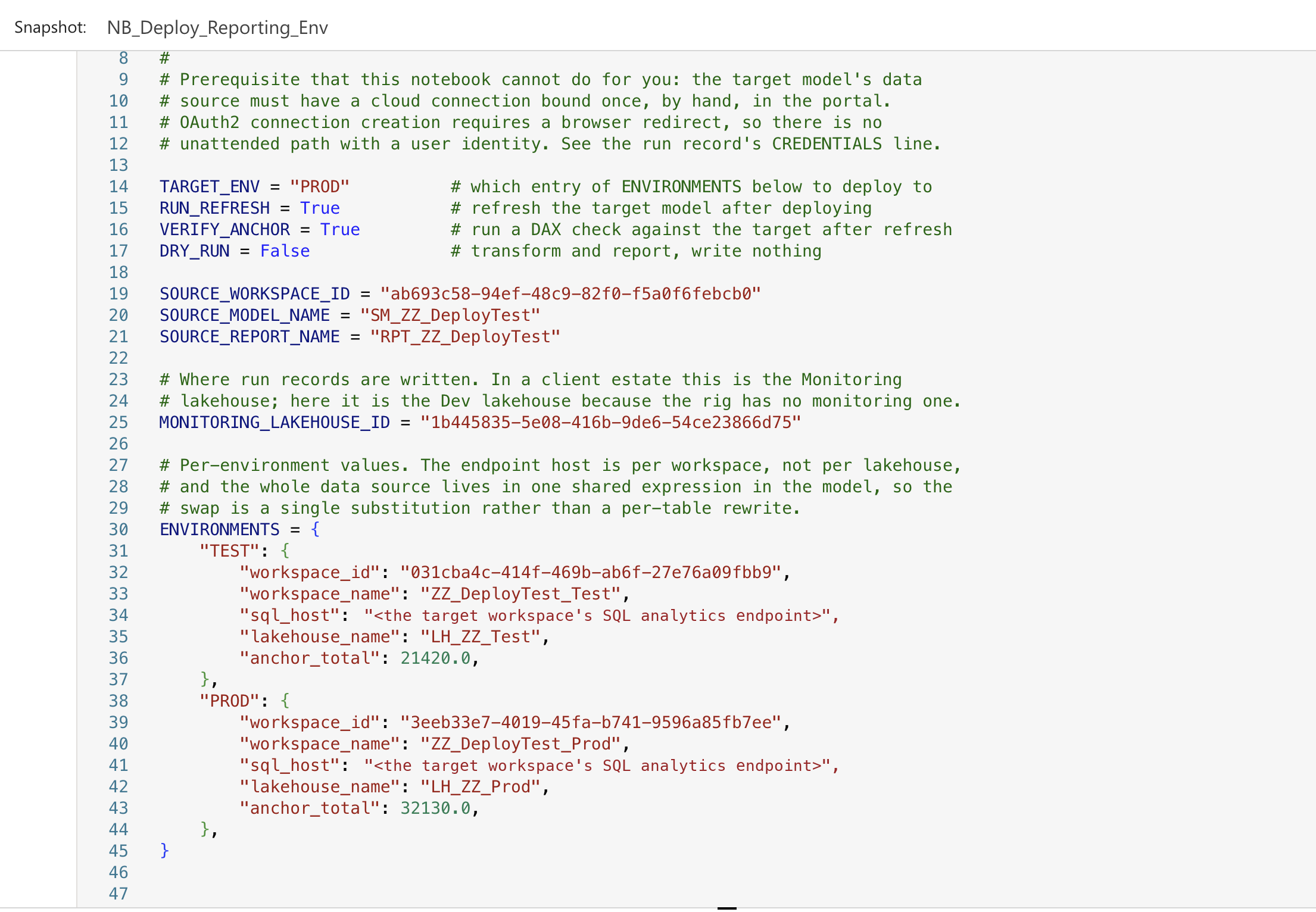
The script is a notebook in the Dev workspace, which is on capacity, and everything that differs between environments sits in one place away from the code. Switching which environment you are deploying to is changing one line.
In the rig that was a dictionary at the top of the notebook. In the client estate it is a Variable Library per semantic model: base variables for what never changes, and a value set per environment overriding only the target workspace, the endpoint, the lakehouse and the anchor. Adding an environment is adding a value set, and onboarding a model is creating a library instead of copying a notebook. Read the library through the REST API rather than notebookutils.variableLibrary.getLibrary(), which hands back only the active value set: no use to a notebook that deploys to several environments in one run.
- Swap the data source. It comes in two shapes, and both give you one place to change instead of a per-table rewrite. Which one you have is decided by whoever built the model, so read it before you write the swap.
M parameters, the common case. The model declares text parameters and every partition calls
Sql.Database(P_Server, P_Database). Change the two values and every table follows.expression P_Server = "<sql endpoint host>" meta [IsParameterQuery=true, Type="Text"] expression P_Database = "LH_Dev" meta [IsParameterQuery=true, Type="Text"] partition fact_sales = m source = let Source = Sql.Database(P_Server, P_Database), Data = Source{[Schema="dbo", Item="fact_sales"]}[Data] in DataThe names belong to the author and they are case sensitive. Two models in one client estate spelled them
P_Serverandp_server, so a script that assumes a convention throws on the second model it meets. Read the names out of the definition, or carry them in the config beside everything else that varies.Literal, the other shape. A shared expression in
definition/expressions.tmdlholdsSql.Database(host, database)inline, and every partition points at it by name, which is why there is still only one thing to rewrite.expression SqlEndpoint = let Source = Sql.Database("<sql endpoint host>", "LH_Dev") in Source lineageTag: <lineage guid>partition fact_sales = m mode: import source = let Source = SqlEndpoint, Data = Source{[Schema="dbo", Item="fact_sales"]}[Data] in DataOn a model that is already deployed, change the parameter, not the definition.
Default.UpdateParametersdoes it with a request small enough to read.updateDefinitionmeans resending the whole definition, which for a real model runs past a megabyte, andfab api -icannot carry that on the command line at all:-i @fileis not supported.# Two values, on a model already in the target. The whole request is this size. fab api -A powerbi -X post \ "groups/$WS/datasets/$MODEL/Default.UpdateParameters" \ -i '{"updateDetails":[ {"name":"P_Server","newValue":"'$TARGET_HOST'"}, {"name":"P_Database","newValue":"'$TARGET_DB'"}]}'Then assert what should have changed, and only that. The obvious check, that the source database name has disappeared, fails on a perfectly correct swap: the SQL endpoint host is per workspace, not per lakehouse, so two environments routinely hold lakehouses of the same name on different hosts. Assert the host, which is the thing that moved.
- Rebind the report. The binding lives in
definition.pbirunderdatasetReference.byConnection.connectionString, and it embeds the workspace name and the model GUID. Deployed verbatim, the report imports successfully, renders, refreshes, and stays bound to the source workspace's model.
Note it carries the workspace name, not its id, so the string breaks on a workspace rename as well as on a cross-environment deploy.This step is per report, not per model. One model with six reports on it means six rewrites, because the binding lives in each report rather than in the model, and a report you forget keeps reading Dev.{ "$schema": "https://developer.microsoft.com/json-schemas/fabric/item/report/definitionProperties/2.0.0/schema.json", "version": "4.0", "datasetReference": { "byConnection": { "connectionString": "Data Source=powerbi://api.powerbi.com/v1.0/myorg/WS_Rep_Dev;initial catalog=SM_Sales;integrated security=ClaimsToken;semanticmodelid=<model guid>" } } } - Bind the connection. API-created import models arrive with a default data connection and cannot refresh until a real connection is bound. Binding an existing connection is scriptable.
Default.BindToGatewayreturns 200 and demonstrably works: a refresh completed through a connection bound that way. The newer Bind Semantic Model Connection route exists, in that it validates a request rather than returning 404, but it refused five different body shapes with one identical message, so its accepted contract could not be established from here. Use the route you can prove. Creating the connection with a user identity is still not scriptable, but a service principal connection is, and it refreshes.# Bind the connection, then refresh through it. fab api -A powerbi -X post \ "groups/$WS/datasets/$MODEL/Default.BindToGateway" \ -i '{"gatewayObjectId":"'$CONNECTION'","datasourceObjectIds":["'$CONNECTION'"]}' fab api -A powerbi -X post "groups/$WS/datasets/$MODEL/refreshes" \ -i '{"notifyOption":"NoNotification"}' # The submit returns 202 whether or not the model can refresh, so read history. fab api -A powerbi -X get "groups/$WS/datasets/$MODEL/refreshes?$top=1" - Verify twice, structurally and by value. The two checks answer different questions, and only one of them always works.
datasetId and datasetWorkspaceId both come back pointing at Dev, with no error anywhere. A production target serving development data would have deployed, refreshed and reported success. Every status code along that path was green. Nothing in the deploy's own output distinguishes that from a correct one, which is why step 4 is not belt and braces.The structural check runs every time. Read the deployed model's own data source back from the service and assert it is the endpoint the config asked for. It does not care what the data says, so it holds even when two environments carry identical rows.
# The structural check. Ask the deployed model what it is reading, and compare
# it with what the config asked for. Works whatever the data says.
fab api -A powerbi -X get "groups/$WS/datasets/$MODEL/datasources"
The anchor is a value check, and it is conditional. Give each environment something you can compute in DAX and compare, a row count, a total, a maximum date, then query the deployed model after refresh and check the answer is the target's and not the source's.
fab api -A powerbi -X post \
  "groups/$WS/datasets/$MODEL/executeQueries" \
  -i '{"queries":[{"query":"EVALUATE ROW(\"anchor\", [Total Amount])"}]}'

# In the rig, Dev answers 10710, Test 21420, Prod 32130, because the three were
# seeded to differ. Where two environments hold the same rows, this returns the
# same number whichever one the model is reading, and proves nothing.
It is conditional because it only works where the environments genuinely differ, and it is worth being honest about how often they do not. In a client estate, Dev and Test held identical finance data, so no measure existed that could separate a correct deploy from one still reading the source, and the one table that did differ moved by a row mid-session, which made a value measured at noon stale by one o'clock. An anchor there is theatre. Where the environments really do differ it is real protection, and in the September rig, seeded at three different scales precisely so a wrong endpoint would show up, it is what caught a misconfiguration. When they do not differ, set no anchor and lean on the structural check instead of inventing a number.
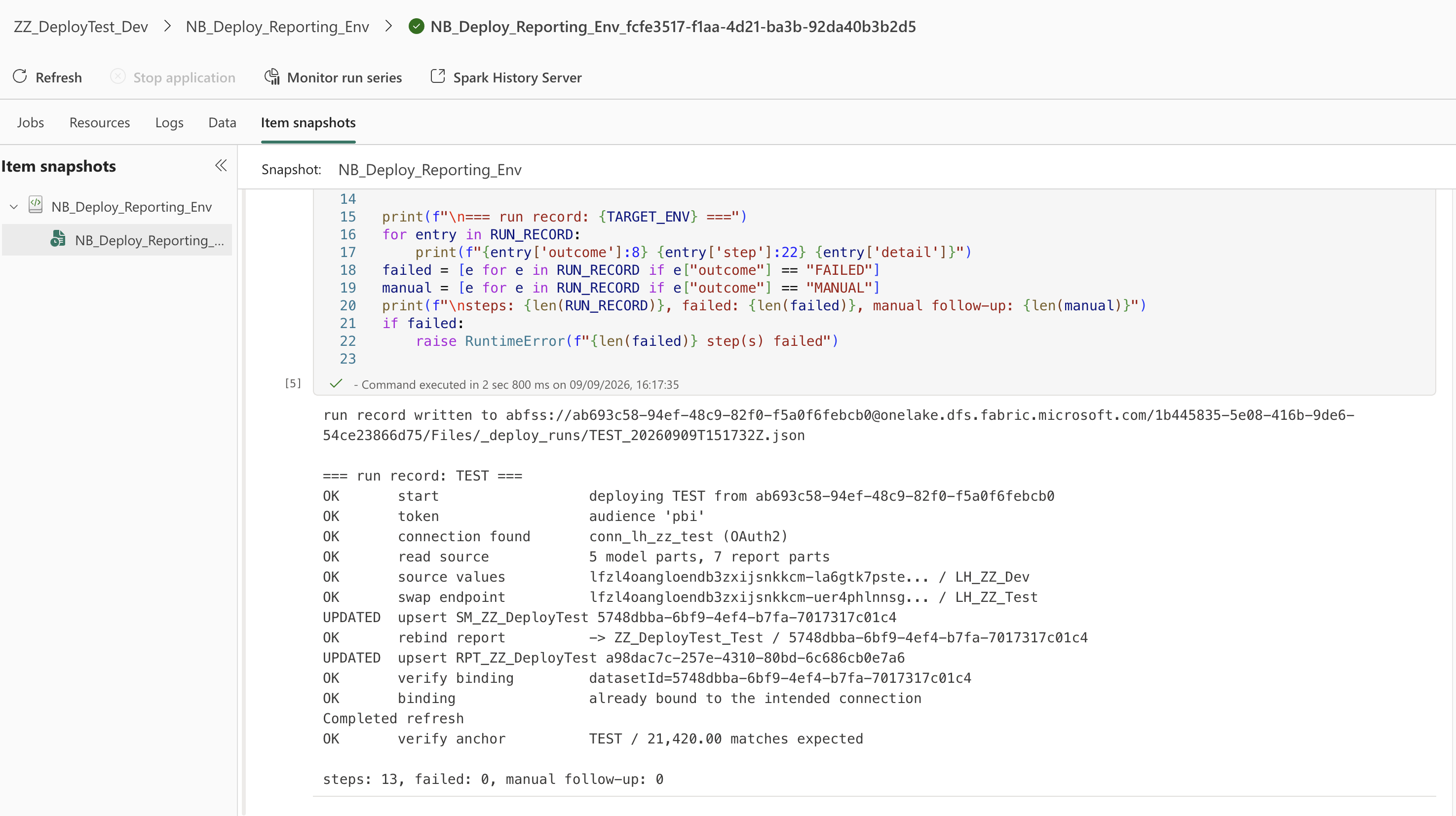
Why a correct deploy looks broken
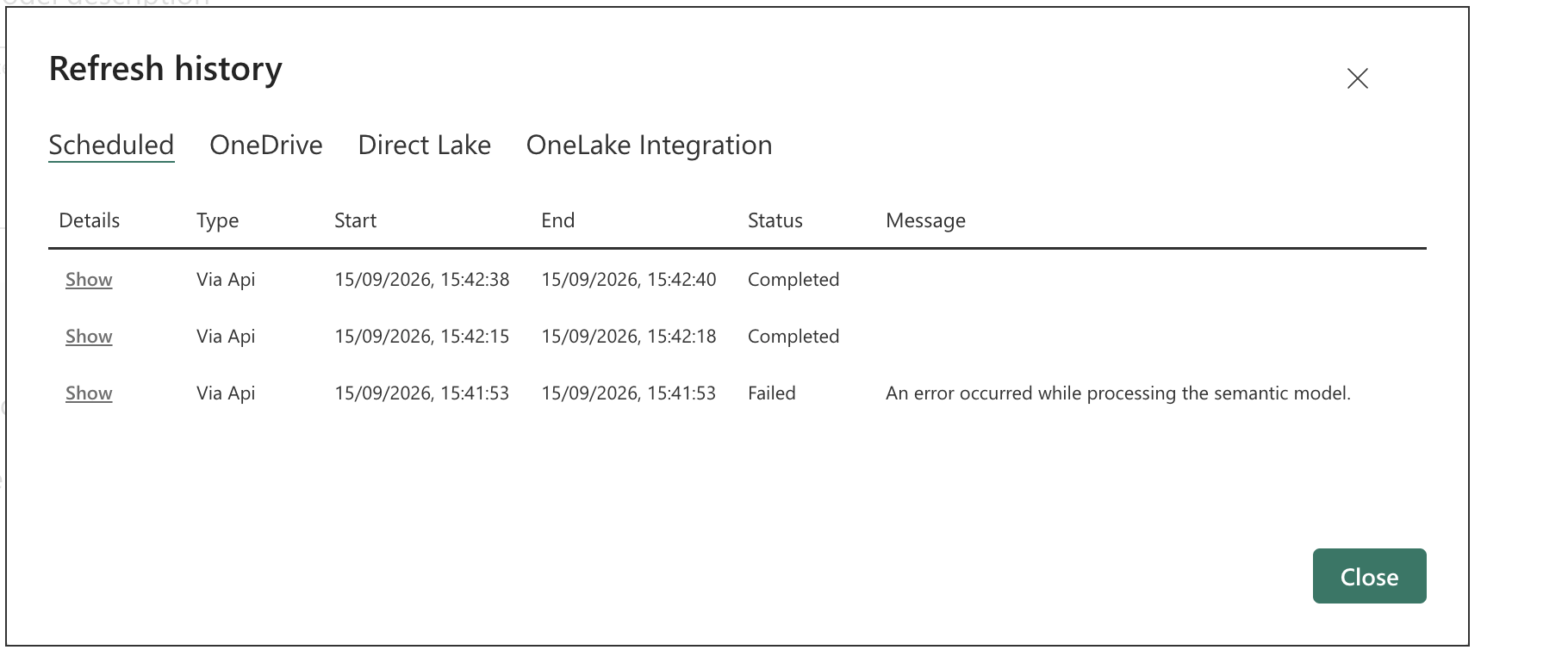
This is the one that costs the most time to diagnose, and it is the finding I would most want before building the notebook. Straight after a semantic model is created, three things read back through the Power BI API are not ready yet, and each one fails a deploy that is in fact correct. All three land after the items have been written, so what you see is a deploy that looks broken rather than one that looks slow. Measured in a client estate, September 2026.
- The data source list comes back empty while the Fabric API already reports the item created, with a correct definition.
- The bind is not reflected on the data source.
Default.BindToGatewaysucceeds, and a read taken immediately still showsdatasourceIdas null; a read a minute later shows it bound. This is the easiest of the three to misread, because nothing reports an error at any point. - The refresh submit is refused on a model created seconds earlier, and the identical call is accepted a minute later.
Poll for all three. The general shape is worth carrying past this pattern: Fabric's write path and Power BI's read path do not share a clock, so anything that creates an item through one API and then verifies it through the other has to wait rather than read once.
Credential types, and what I found
| Credential type | Creatable by API | Works from a workspace with no capacity |
|---|---|---|
| OAuth2, user identity | No. ConnectionDetailsTypeNotSupportedForOAuth2: "Given connection details type 'SQL' is not supported for OAuth2 credentials." Note also that UseCallerIdentity is now required and must be true, and omitting it returns a generic invalid-input error that looks like a malformed payload rather than an unsupported combination. | Yes, once created and bound in the portal |
| Workspace identity | Yes, returns 202 and the identity appears with an application ID and a service principal ID. Provisioning is asynchronous, so a read straight after the call finds nothing. | Yes. It provisioned on a workspace with no capacity at all, which is the opposite of Microsoft’s documented position. Whether that identity can then authenticate a refresh is a separate question, and I did not test it |
| Service principal | Yes. skipTestConnection is refused for SQL, so the credential is validated at creation: a 201 means the principal really can reach the lakehouse | Yes, and the whole path runs unattended. Connection created, bound, and the refresh completed through it, with no portal step anywhere |
The credential requirement is not caused by Pro. This matters because it is easy to blame the pattern. The same model in a workspace on capacity failed refresh in exactly the same way until the connection was bound. It is a property of API-created import models, so moving to capacity would not avoid it.
What failure looks like. Missing credentials produce Premium_ASWL_Error, "uses a default data connection without explicit connection credentials", and it shows up in refresh history, not at submission. The submit call returns 202 either way, so a deployment script that checks only the submit response will report success on a model that cannot refresh.
What stays manual
- Creating the cloud connection, once per environment. With your own account this is a portal action and cannot be scripted, so you make the connection by hand the first time and the notebook uses it from then on. A service principal removes even that, and then the whole path runs with nobody watching.
- The service principal tenant switch, if you take that route. In a client tenant that is the client's admin, so raise it early.
- Authoring and publishing from Power BI Desktop, if that remains the authoring route.
- Connecting a workspace to git. With GitHub that means a personal access token entered in the Fabric interface; Azure DevOps uses the signed-in identity.
- Updating the app after a deploy. I have not tested this, and I know of no public API for updating an app's content. Treat it as manual until proven otherwise.
What it costs
One Fabric capacity for the engineering layer, and Pro licences for everyone who builds or views reports. The saving against a full pipeline setup is capacity on the reporting workspaces; the cost is a notebook somebody has to own.
What breaks
- No XMLA endpoint on a workspace without capacity.
executeQueriesis the only programmatic way to query a deployed Test or Prod model, so validation tooling cannot use TOM. - Every shared-capacity limit still applies to the Pro workspaces: eight scheduled refreshes a day, a two-hour refresh ceiling, 1 GB models. All three are Microsoft's documented figures.
GET /tableson a lakehouse lags OneLake. It returned an empty array for lakehouses that already held the table, so never gate a deploy on it. Check the OneLake path instead.- Notebook standard output is not retrievable through the jobs API, which reports only that the system cancelled the Spark session. The driver logs do carry it, through the Spark monitoring APIs and a Livy session ID, which is more work than having the notebook persist its own run record as it goes.
report.jsonhas mandatory properties most notes omit. It rejects a payload withoutthemeCollection, then withoutreportVersionAtImportinsidebaseTheme, one error at a time. A failed report import rolls back cleanly and leaves no stub.- Refresh goes through the Power BI endpoint, not the Fabric one. Fabric's refresh endpoint returns 404 for a model freshly touched by
updateDefinition. - A deleted item keeps its name for a few minutes. Recreate it too quickly and you get a 409 saying the name is not available yet. Retry rather than invent a second name, or you will be living with it.
- Token aliases matter.
notebookutils.credentials.getTokenacceptspbi,https://api.fabric.microsoft.comandhttps://analysis.windows.net/powerbi/api, all returning a token both APIs accept. The bare aliasesfabricandpowerbifail with400 REQUEST_INVALID.
When this breaks down
The reporting audience grows past the point where per-viewer Pro licensing beats F64, or the reporting layer needs Fabric items of its own. At that point every workspace can go on capacity, you collapse back to a pipeline or a build, and the deployment notebook becomes unnecessary. That is a good outcome, and it is worth writing into the design so that nobody defends the notebook past its usefulness.
The collapse goes to capacity and deployment pipelines, or straight to git and build if the repository is already driving it.