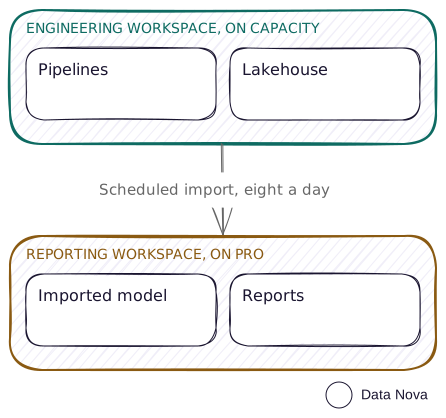
Engineering sits on a Fabric capacity: pipelines, notebooks, the lakehouse. Reporting sits in a Power BI Pro workspace, with an imported semantic model that reads from the lakehouse and reports built on top of it. The capacity does the data work. The per-user licences do the reading.
Why split the licence too
Split, Direct Lake puts both workspaces on the capacity, and the model reads the lakehouse in place. That is the better pattern when the capacity can carry it. On a smaller SKU it often cannot, for two specific reasons.
Direct Lake requires a Fabric capacity. Microsoft's storage mode comparison is blunt about it: Direct Lake is licensed for Fabric capacity subscriptions only, while Import runs on any Fabric or Power BI licence. So a Pro workspace cannot host a Direct Lake model at all. Import is the only thing that works on that side of the boundary.
The second reason is memory. Direct Lake models are capped by SKU, and on the smaller ones the cap is tight: 5 GB on F16, 10 GB on F32, against 25 GB on F64. That memory is the same pool your engineering work draws on. So on a small capacity there are two questions: whether you want to spend capacity on reporting, and whether the model will fit alongside everything else.
Moving the model to Import on Pro answers both. The interactive query load leaves the capacity entirely, and the model is no longer competing for capacity memory.
Pros and cons
Pros
- The capacity stays for engineering. Report queries run on shared capacity, so they are not competing with pipelines and notebooks for CUs.
- No Direct Lake memory ceiling. The model is not bound by the SKU guardrail, which is the constraint that bites first on F16 and F32.
- A smaller SKU goes further. You are buying capacity for the work that genuinely needs it, and licences for the people who read the output.
- Familiar modelling. Import is the mode most teams already know, with no Direct Lake fallback behaviour to reason about.
- The engineering side keeps everything. Git integration, deployment pipelines and the full Fabric item set are all still there, because that workspace is on a capacity.
Cons
- Refresh limits come back. The reporting workspace is on shared capacity, so eight scheduled refreshes a day and a two hour ceiling on each one.
- Data is copied, and stale between refreshes. Import holds its own copy. Direct Lake reads the current Delta files, so you are trading freshness for isolation.
- Model size limits apply. An imported model in the service is capped at 1 GB, with a separate 10 GB limit on uncompressed data processed during a refresh.
- Every reader needs Pro. The reporting workspace is a Pro workspace, so every reader needs a licence of their own and the capacity covers none of them.
- No XMLA write on that side. Pro workspaces do not support XMLA write operations, so no Tabular Editor writeback and no ALM Toolkit against the published model.
- Two lifecycles to run. The engineering workspace has Git and deployment pipelines. The Pro workspace has neither, so the reporting half is promoted by hand.
Where this fits
- A smaller capacity doing real engineering. You have an F16 or an F32 earning its keep on pipelines, and you would rather not spend it serving reports.
- A reporting audience that already has Pro. If the readers are licensed anyway, putting the reports where they already are costs nothing extra.
- A model that fits comfortably in Import. Aggregated or curated data, at a grain well above the lakehouse's own.
- Reporting that does not need minute-by-minute freshness. Daily or a few times a day, inside eight refreshes.
When this breaks down
- The model outgrows what Import will hold, or a refresh will not finish in two hours
- Reporting needs to be fresher than a scheduled refresh allows
- The reader count grows to the point where licences cost more than sizing the capacity up
- You want one lifecycle across both workspaces, with nothing promoted by hand
When you hit these, the answer is usually a larger capacity and Split, Direct Lake, which puts the model back on the capacity and removes the refresh ceiling.
Considerations
- Refresh still touches the capacity. The queries move off it, but the import has to read from the lakehouse, so the extract hits the SQL analytics endpoint each time. That is a short burst a few times a day, and shedding the continuous interactive load is the actual saving.
- Sizing is a method you work through. F16 and F32 are used here because that is where the Direct Lake memory guardrail starts to bind. They illustrate that threshold, and no SKU named here is a recommendation.
- Watch the region. Direct Lake models must sit in the same region as their data source workspace. This pattern never runs into it. It is worth knowing anyway, before you move a model back onto the capacity later.
- Name the boundary in the workspace name. Two workspaces on two different licence types is exactly the situation where someone opens the wrong one. See naming conventions.