One workspace per audience, organised by folders, running on the tenant's shared capacity. Everything in it is a Power BI item: dataflows, semantic models, reports. There is no lakehouse, no notebook and no pipeline, because each of those needs a Fabric capacity and there isn't one. Transformation happens in Power Query, either inside the model or in a dataflow.
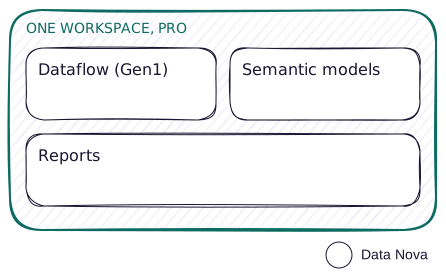
Why teams are here
Some teams choose this deliberately. The data is small, the audience is known, and nobody wants to manage a capacity. Others are here because the licences were already bought and a capacity has not been signed off. Both are common, and the pattern carries real reporting either way. What matters is knowing which limits you are working inside, because every one of them is a specific number.
It is worth saying plainly that this is a starting point in its own right. The topologies that follow all assume you can create a lakehouse, and until someone buys a capacity, you cannot.
Pros and cons
Pros
- Nothing to administer. No capacity to size, no CU budget to watch, and no throttling to explain to anyone.
- Predictable cost per person. You are buying seats, so the bill moves with headcount and is easy to forecast.
- Fast to start. Power BI Desktop publishes straight to the workspace. There is no platform to set up first.
- Imported models are quick. For data that fits, an imported model is the fastest thing to query in the stack.
- Familiar. Most teams already know how to work this way, so nothing has to be learned before anything gets built.
Cons
- No Fabric items at all. No lakehouse, notebook, pipeline or Dataflow Gen2. A capacity is required for every one of them.
- Eight scheduled refreshes a day. The quota resets at 12:01 AM in the model's local time zone. Manual refreshes in the service don't count against it, but REST API refreshes do.
- Two hour refresh ceiling. A refresh that runs longer than that fails outright. This is the limit that causes real trouble, and the refresh count rarely does.
- No XMLA write. No Tabular Editor writing back to a published model, no ALM Toolkit, and most of Semantic Link Labs is unavailable.
- No source control and no release process. Git integration and deployment pipelines both need a Fabric capacity. Your versioning is whatever you do with .pbix files.
- Every reader needs a licence. Pro content can only be shared with other Pro users, so every extra reader adds cost even when the work stays the same.
Where this fits
- A first Fabric project with no capacity yet. You need reporting now, and the capacity conversation has not happened.
- A small, known audience. Twenty people who need a licence anyway, reading departmental reports.
- Data that fits comfortably in an imported model. The service caps an imported model at 1 GB, and separately caps the uncompressed data processed during a refresh at 10 GB. The second one is usually what you hit first, because it accounts for compression.
When this breaks down
- A refresh won't finish inside two hours, even with incremental refresh
- The audience grows past the point where per-seat licensing beats a capacity
- You need to land raw data somewhere before shaping it
- You need to ship a report without shipping everything else alongside it
- You want source control on the work
When you hit these limits, Starter topology is the first pattern that assumes a capacity, and the natural next step.
Considerations
- Put the environment in the workspace name. You have no capacity to signal it and no deployment pipeline to move content between stages, so the name is the only marker you get.
- Work out your own crossover. Divide your F64 monthly cost by the Pro per-user cost, and count readers only. Authors need Pro either way, so they sit on both sides of the comparison. At F64 and above, a free user with a viewer role can read your reports.
- PPU is not the Fabric upgrade. It gives you 48 refreshes a day, models over 1 GB and the XMLA endpoint, but it does not provision a capacity, so there is still no lakehouse. It also narrows sharing further, because PPU content needs PPU licences.
- Gen1 dataflows are legacy. They still work on Pro, and Microsoft's guidance is that Pro and PPU customers should carry on using them. They get no new investment though, and linked tables, computed tables and dataflow incremental refresh are all Premium.