This is for a team that has already decided to deploy from a repository. Deciding is a different job and the deployment patterns guide does it. This one is the setup, all of it in one place. The work splits across two consoles, Fabric and Azure, and they are usually owned by different people.
The estate this follows
The example is UK road safety: the collision, casualty and vehicle files the Department for Transport publishes each year, built into a star schema and reported on. It uses most of what Fabric offers:
- A data pipeline, running the three notebooks in order.
- Three notebooks, landing the raw files, building the dimensions, and building the fact table.
- A lakehouse, holding the raw files and the cleaned tables.
- A warehouse, holding the star schema the semantic model reads from.
- One semantic model, over the warehouse.
- Three reports, connected live to that model.
A data engineer builds the pipelines, notebooks, lakehouse and warehouse. A BI developer builds the model and the reports. One person reviews and one approves. Everything on this page applies to all of those items, not only to the semantic model and the reports.
One model with three reports on it is how most Power BI estates are built. A live connection stores the workspace and the model it points at inside the report, so moving a report between environments means rewriting that, once per report. The cross-cutting page has what that costs in each pattern.
The workspaces are WS_RoadSafety_Dev, WS_RoadSafety_Test and WS_RoadSafety_Prod. The environment is a suffix so that one project's three workspaces sort together, which is the rule on the cross-cutting page. Item names inside them carry no environment, and the naming guide covers those.
Who does what
Five roles appear in this setup. One person can hold several of them, and in a small team usually does. Keep the author of a change and the person who approves it separate, because an approval given by the author does not check anything.
| Role | Owns | What the setup has to give them |
|---|---|---|
| The data engineer | Pipelines, the lakehouse, the warehouse behind the model | Somewhere to run a half-finished notebook that is not where everybody else is looking |
| The BI developer | The semantic model, and the three reports connected live to it | A place to publish a model change before anybody else sees it |
| The reviewer | Reads every pull request, and is never its author | The only control on what reaches the shared workspace |
| The approver | The gate between Test and production | To be able to say no, which means the gate sits on the environment rather than in the pipeline |
| The Fabric tenant administrator | Tenant settings, and the capacity | Needed once, in week one. Ask early, because it usually takes weeks |
| The Entra administrator | The app registration and its security group | Usually a different person from the Fabric administrator |
Two sides
On the Fabric side you turn on tenant settings, assign a capacity, create the workspaces, and connect one of them to git. Most of this is done once.
On the Azure side you register an application in Entra for the build to run as, create a project and a repository, set a branch policy, and create the environments the approval attaches to.
The two sides meet at the service principal. It needs a permission from each.
The Fabric side
Tenant settings
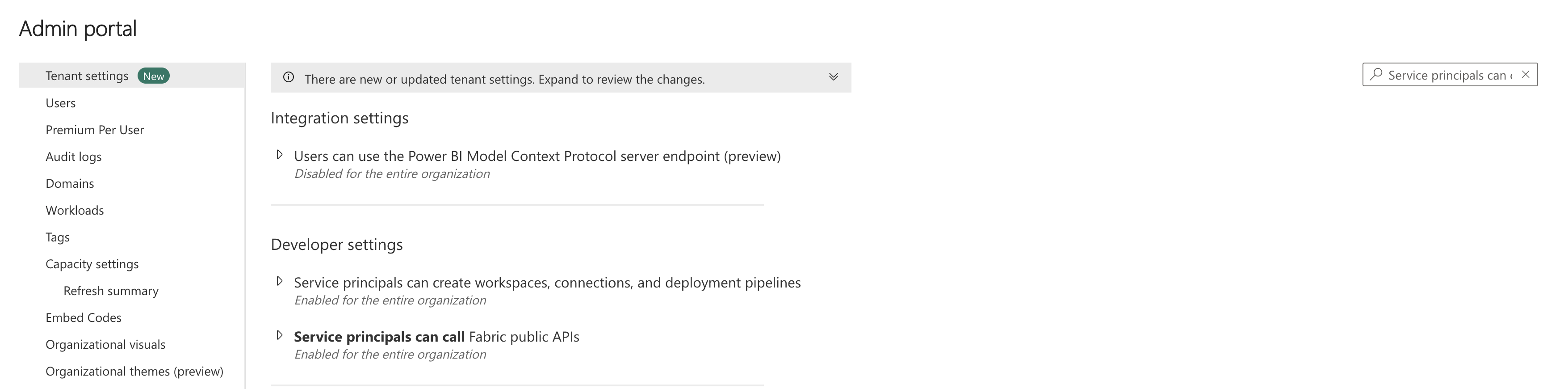
These live in the admin portal, not in workspace settings, and only a Fabric administrator can change them. Ask for all of them at once.
| Setting | Where | Set it to | Why it matters |
|---|---|---|---|
| Service principals can call Fabric public APIs | Admin portal, Developer settings | Enabled, for a named security group | Required for any deployment. It can be granted tenant wide or to a security group. Ask for a group, so the grant stays reviewable |
| Service principals can create workspaces, connections, and deployment pipelines | Admin portal, Developer settings | Enabled, for the same group, only if the build creates workspaces | Off by default. Without it POST /v1/workspaces fails for the principal while every other call works |
| Users can synchronize workspace items with their Git repositories | Admin portal, Git integration | Enabled, for the group that builds | Enabled by default. Git integration also needs Users can create Fabric items |
| Users can export items to Git repositories in other geographical locations | Admin portal, Git integration | Only if your Azure DevOps organisation is in a different region from the capacity | Ignore it until a connection fails for a reason that mentions geography |
| Service principals can access read-only admin APIs | Admin portal, Admin API settings | Only if you plan to inventory the tenant | Not needed to deploy. It sits next to the one above and is easy to switch on by mistake |
The Fabric side in the portal, or as code
Most of these can be done either way. Use the portal the first time, so you can see what the call is doing. Use the API once you are creating the third or fourth workspace, so the names match.
| What | In the portal | As code | Note |
|---|---|---|---|
| Create a workspace | Workspaces, New workspace, then name it and pick the capacity | POST /v1/workspaces with capacityId in the body | One call. assignToCapacity is for moving an existing workspace later, and needs the Admin role |
| Add a role | Workspace, Manage access, Add people or groups | POST /v1/workspaces/{id}/roleAssignments | The body takes a group or a service principal the same way it takes a person |
| Connect to git | Workspace settings, Git integration, then pick organisation, project, repository, branch and folder | POST /v1/workspaces/{id}/git/connect, then initializeConnection | Needs the Admin role. A service principal can only call it with a configured Azure DevOps connection, created first, and has to be a user in the Azure DevOps organisation |
| Tenant settings | Admin portal, Tenant settings | POST /v1/admin/tenantsettings/{name}/update | It needs a Fabric administrator identity either way, so this lets an administrator script the change rather than removing the wait for one |
The calls above are the Fabric REST API. The fab command line tool wraps the same endpoints and reads more easily in a script. Either works.
Capacity
Every workspace in this setup sits on a Fabric capacity. Git integration needs one, and so does everything Fabric does outside Power BI. A Power BI Premium P capacity also works, for Power BI items only.
A trial capacity works for learning this. Do not build the estate you keep on one: when the sixty days end the workspace drops to Pro, every Fabric item in it goes inactive, and you have seven days to move it to a paid capacity before they are removed.
The workspaces
| Workspace | Git connection | Who writes to it | Needs |
|---|---|---|---|
WS_RoadSafety_Dev | Connected to main | The build, and nobody by hand | Capacity |
WS_RoadSafety_Test | Nothing | The build, from the same commit that reached Dev | Capacity |
WS_RoadSafety_Prod | Nothing | The build, after the approval | Capacity |
Test and production are connected to nothing. They receive their contents from the build, which reads the same commit that reached Dev and substitutes the values that differ. Connecting each environment to its own branch is documented and is the arrangement to avoid: it removes the build step, and the build is where the connection strings and other per-environment values are swapped.
A fourth kind is optional: one workspace per branch. Somebody who wants to test a change without anybody else seeing it has to publish it somewhere, and that means another workspace on the capacity. In most cases you do not create these yourself: Branch out makes the branch and the workspace together, which is covered below. Name them for the branch rather than the person, because a name that says who made something goes stale the day they change team.
Workspace roles
Assign every one of these to a group, never to a person. It is the same amount of work on the first day, and it means adding or removing somebody later is one change in one place.
| Role | Who gets it | Note |
|---|---|---|
| Admin | A group of two, for connecting git and assigning capacity | Connecting a workspace to git needs Admin, and so does moving it to another capacity |
| Member | The build, only if its provisioning script also assigns roles | Adds the ability to assign workspace roles, which is the one thing here Contributor cannot do |
| Contributor | The developers, and the build | Enough to create, overwrite and delete items, which is what a deployment does |
| Viewer | Nobody | Consumers get the app published from Prod, never a role in the workspace |

Connecting Dev to git
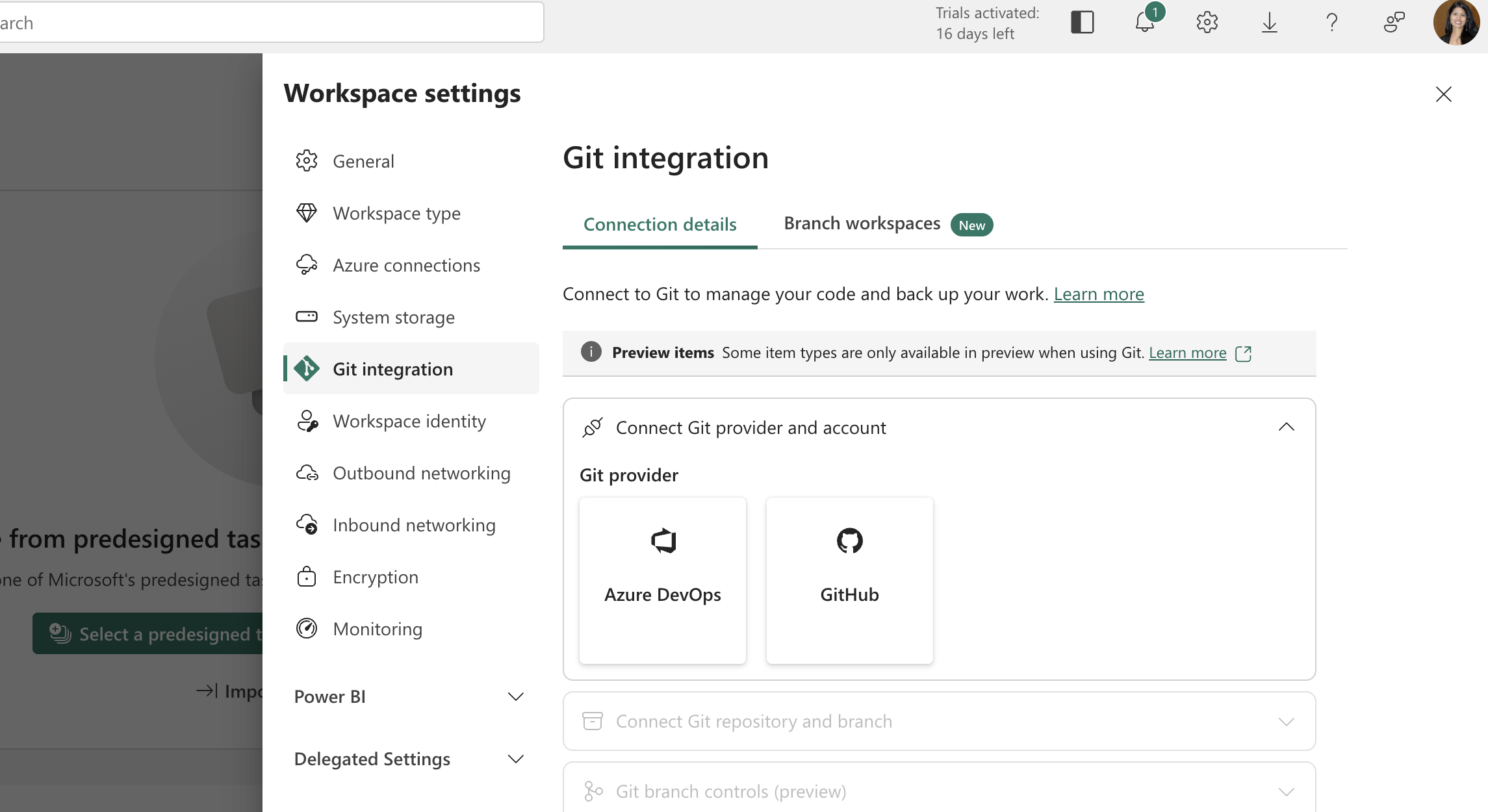
In the Dev workspace, workspace settings has a Git integration panel. If it is not there, the tenant setting above is off, or you are not in the group it names.
You give it the Azure DevOps organisation, the project, the repository, the branch and a folder. The branch is main. The folder matters more than it looks: choose one and never change it, because moving it later makes every item look new to the build.
How a change gets into git
Everything above is about workspaces. This is the part that connects a person to them, and it is the step most often left out, which leaves a reader with a pull request they have no way to produce.
Branch out, which does most of this for you
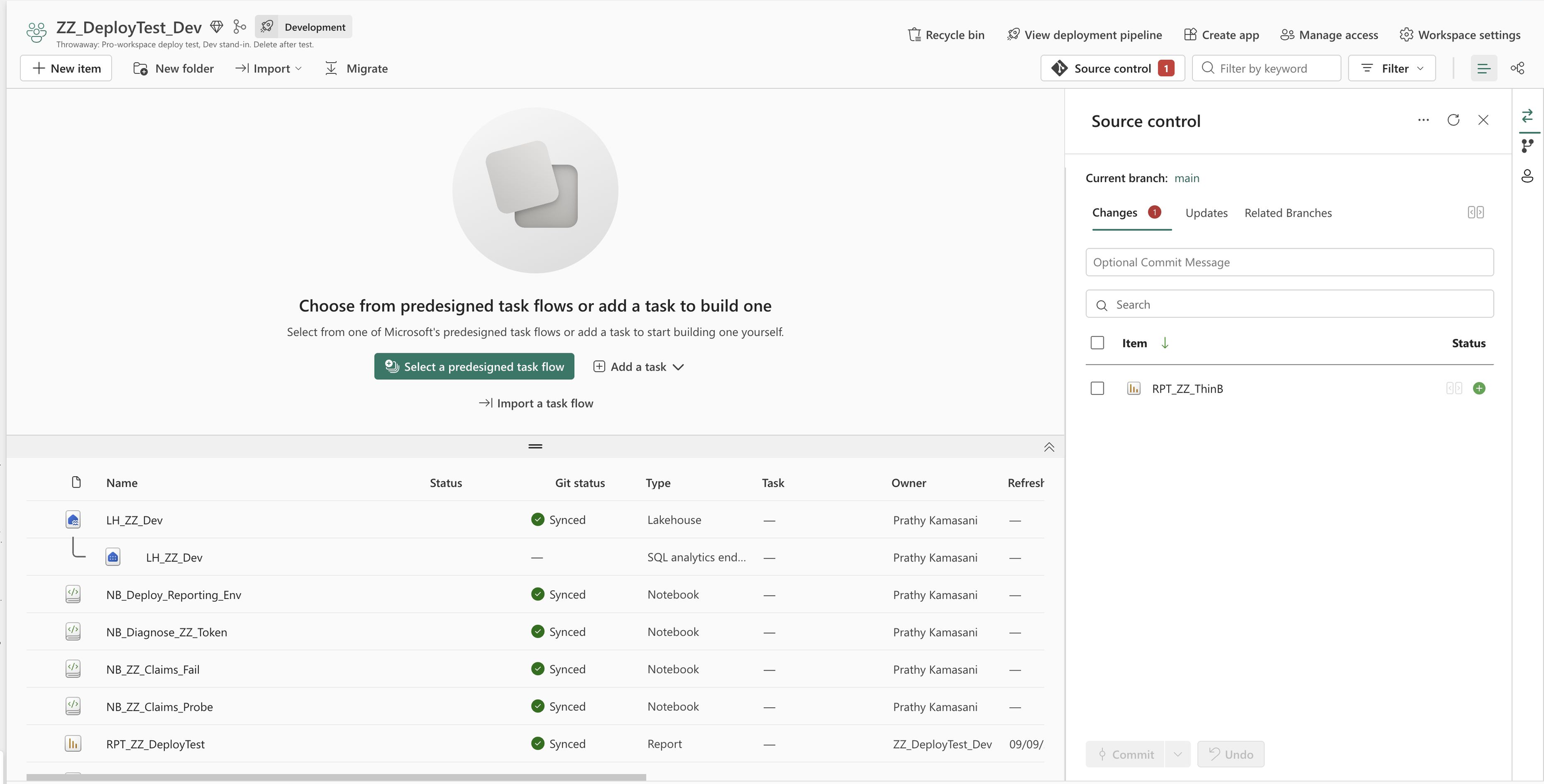
Fabric has a first-class answer to this and it is worth using rather than building your own. In the Dev workspace, Source control, Branch out creates a new git branch from the one that workspace is connected to, creates a workspace connected to that new branch, and syncs the items into it. One action, one dialog.
The new workspace is a branch workspace, which is a real relationship and not just a naming convention. Fabric shows the source workspace as its parent in the workspace tree, puts a link back in the breadcrumbs, and lists it under related branches in Source control. So a team can see who is working on what without asking.
- It needs capacity. The new workspace has to go somewhere, which is the cost that decides whether every developer gets one.
- Everything comes across by default. Select items individually narrows it, and then every dependency of what you pick has to come too.
- Branching out into an existing workspace can lose work. Anything in it that is not committed to git may be deleted. Commit first.
- Only git-supported items make the trip. Anything Fabric does not yet put in git is not in the new workspace.
From there the developer works in their own workspace, commits to their own branch from Source control, and raises the pull request into main. When it merges, the shared Dev workspace is prompted to update.
By default only a workspace admin can switch a branch. There is a per-workspace setting, Allow users with at least Contributor role to change Git branch, which opens it to the people who actually build. Decide that one deliberately.
If you automate provisioning instead of using Branch out, the relationship is not created for you. There is a preview Create Workspace Relation API to establish it after your script has made the branch, made the workspace and connected it. Without that call you get workspaces that work and a tree that shows nothing.
What to call a branch, and what the name makes
Branch out asks for two names, the branch and the workspace, and it does not work one out from the other. Type them independently often enough and nobody can tell which workspace belongs to which branch, which matters because the workspace is the thing costing capacity and the branch is the thing under review.
One branch is long-lived and the rest are not. Everything is cut frommain, lives as long as the work does, and goes when it merges. The prefix is the only part a reader needs, because it says what kind of change is arriving before they open it.
| Branch | Lives for | What it carries |
|---|---|---|
main | Long-lived | The only branch the build deploys from, and the one the branch policy protects. Nobody commits to it directly |
feature/<short-name> | Until it merges | A new measure, a new page, a new notebook. Merges into main, then the branch and its workspace both go |
fix/<short-name> | Until it merges | A number is wrong, or something is broken in Test. Same path as a feature, and the name is what says it is not new work |
hotfix/<short-name> | Hours | Production is broken now. Same path, but the name tells the reviewer and the approver why they are being asked out of hours |
The workspace name cannot simply repeat the branch name. Workspace names have to be unique across the whole tenant, while a branch name only has to be unique in its repository. So feature/margin-measure is a fine branch and a poor workspace, and the workspace it creates wants the project in front of it: WS_RoadSafety_feature_margin-measure. Same words, in an order that survives a tenant with four other teams in it.
Two limits are worth knowing before someone writes a sentence as a branch name. A branch name can be 244 characters, but the full path of a file in the repository can only be 250, and a Fabric item sits several folders deep inside its own. A long branch name and a deeply nested report is the combination that fails, and it fails at sync rather than at naming.
The semantic model and the reports
These are authored in Power BI Desktop, and two preview settings decide whether any of the review in this guide is possible. In Options, Preview features, turn onPower BI Project (.pbip) save and the TMDL andPBIR formats. Saving without them produces a .pbix, which is a single binary file: it cannot be diffed, cannot be reviewed, and turns every merge into a choice between two whole files.
Connect live to the warehouse in the developer's own workspace, build the model, build the reports against it, and save as .pbip into the working copy of the branch. Publish to the workspace to see it running, and commit the project files from the branch.
The Azure side
What a service principal is
Two things share the name. An application registration is the definition of an application in Entra: its identity, its secrets, what it is allowed to ask for. A service principal is the instance of that application inside a particular tenant, and it is the thing that holds permissions. The portal creates both at once. The command line does not, which is why the table below has two commands. When somebody says "give the service principal access", the service principal is the object they mean.
It is an account a build signs in with. It has an identity, it can be given access to a workspace the same way a person can, and it can sign in with nobody present.
A build can run as you instead, and it will work. There are two reasons not to. It stops the day you change role or leave, and it can do everything you can do. If a developer can deploy to production by running the pipeline as themselves, the approval on the environment is not stopping anything.
Creating it
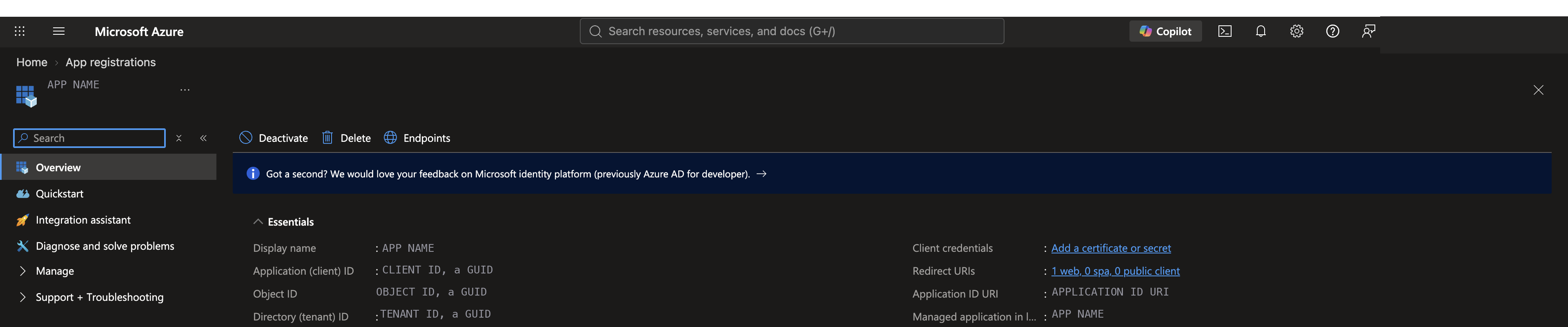
In Entra, register an application, then create a client secret or upload a certificate. Use a certificate if your organisation allows it. A secret expires, and the error only says authentication failed. Note the tenant id and the client id, which are not secret, and put the secret straight into a key vault.
Then create a security group and put the application in it. A tenant setting can be enabled for the whole organisation or for named groups. Ask for a group, so the grant stays reviewable, and ask for it at the same time as the registration.
How the pipeline signs in as it
In Azure DevOps this is a service connection: a stored link to the service principal that a pipeline task can use by name. The pipeline never sees the secret. It runs a task under the service connection, and the script inside picks up the signed-in identity from the environment.
Microsoft's own reference for this does exactly that. Its pipeline runs an Azure CLI task naming a service connection, and the Python inside asks for AzureCliCredential(), which is the credential that task has already established. There is no secret anywhere in the repository or the pipeline definition.
az account set with "the subscription doesn't exist in cloud AzureCloud", before anything of yours has run. Fabric needs no subscription at all, so this is an obstacle created entirely by the way the task works.You have three ways past it. Give the principal a role on a subscription, which is the least appealing because it grants Azure access for a Fabric job. Use workload identity federation, which Microsoft now recommends over a secret and which removes the expiry problem below. Or skip the service connection and sign in yourself:
- script: |
    az login --service-principal -u "$(SP_CLIENT_ID)" -p "$SP_SECRET" \
      --tenant "$(SP_TENANT_ID)" --allow-no-subscriptions --output none
    python -u deploy/deploy_workspace.py --workspace-id "$(WORKSPACE_DEV)" ...
  env:
    SP_SECRET: $(SP_CLIENT_SECRET)
That last one keeps the secret in a variable group rather than a service connection, which is a real trade: one fewer Azure dependency, one more place a secret lives. For a team with no Azure subscription to hand, it is often the only one of the three that is available.
Where the secret lives
Anything the pipeline needs beyond the service connection goes in a key vault it reads at run time. Not in a pipeline variable, even a secret one, and not in the repository in any form. A vault gives one place to rotate it and one place to revoke it. Set the expiry reminder the day you create it.
The project and the repository
One project, one repository, and three environments named for the three workspaces. Do not create a repository per workspace. The point of this pattern is that one commit is deployed to three places, and three repositories give you three separate histories that cannot be compared.
The pipeline, and the order to create things in
Point a new pipeline at the YAML in the repository and run it once. The order matters here, because two of these steps depend on something the previous one creates.
- The repository, with the pipeline definition committed to it.
- The service connection, which the pipeline names.
- A variable group holding the three workspace ids and the service connection name. The provisioning script prints the ids.
- The pipeline, created from the YAML.
- Permission, granted once per protected resource. A pipeline cannot use a service connection or an environment until somebody authorises it, and the first run stops and waits rather than failing.
- The first run, which creates the environments.
- The branch policy, because build validation has to name a pipeline that exists.
- The approval on the Prod environment, which now exists to attach it to.
Steps six and seven are the ones that catch people. A branch policy cannot point at a pipeline that has never run, and an approval cannot attach to an environment that has not been created.
succeeded(), then on a merge the first stage is skipped, andsucceeded() is false for a dependency that was skipped rather than run. Every later stage skips in turn and the run reports success. Give the first deploying stage dependsOn: [].That one is worth knowing beyond this setup, because a pipeline that skipped everything looks exactly like a pipeline that deployed everything: same green tick in the run list, same badge, same notification. The only tell is the stage cards saying skipped, or checking afterwards that the target actually changed. It is the same argument as checking a value rather than a status, one level further out.
What lives in project settings
Four of the things this guide asks for are in Azure DevOps project settings rather than anywhere you would look first, and they are easy to hunt for.
| What | Where in project settings | Why it is there and not elsewhere |
|---|---|---|
| Service connections | Pipelines, Service connections | It belongs to the project, not to one pipeline, so several pipelines can use it and one person can revoke it |
| Agent pools and parallel jobs | Pipelines, Agent pools | A new organisation has no free Microsoft-hosted parallelism until you request it, and the first pipeline run queues forever with no error |
| Repository policies and permissions | Repos, Repositories | Branch policies are set per branch here, and who may bypass them is set alongside |
| Pipeline settings and retention | Pipelines, Settings | Where you stop new pipelines being created as classic release definitions, and how long runs are kept |
Branch policy
A branch policy is how main stops being a branch anybody can write to. It matters more here than in ordinary code, because the shared Dev workspace is downstream of main. A bad merge reaches the model that everybody is working against, within minutes, rather than waiting to be noticed.
| Policy | Set it to | Why |
|---|---|---|
| Require a minimum number of reviewers | One, with Allow requestors to approve their own changes unticked | Without it anybody can merge their own change |
| Check for comment resolution | On | An unanswered review comment is the most common way a known problem ships |
| Limit merge types | Squash | One commit per merged change keeps the history readable |
| Build validation | On, pointing at a build that validates rather than deploys | Catches a broken item definition before the shared workspace rather than after |
Not every Fabric item can be read in a diff.
| Item | What is in the repository | Can a reviewer read the change? |
|---|---|---|
| Notebook | The code, as a .py file | Yes. It is an ordinary code review |
| Semantic model | TMDL, which is text, with a file per table. Measures sit inside their table’s file | Yes. A new measure is a few readable lines |
| Data pipeline | JSON describing the activities | Partly. A changed setting is findable, a rearranged pipeline is not |
| Report | A folder of JSON, including where every visual sits | No. Moving one visual produces a diff nobody can read |
| Warehouse | A SQL database project, one .sql file per table, view and procedure | Yes. A column change is an ordinary DDL diff. The feature is in preview |
| Lakehouse | Metadata and shortcut definitions. No tables and no files | Not applicable. Nothing about its contents is in the repository |
So a review of a notebook, a model or a warehouse change is a real review. A review of a report or a pipeline change is a check that the file which should have changed is the one that did, and that nothing else moved. Say which of the two you are asking for.
Two people on one model
TMDL puts each table in its own file, so two people adding measures to different tables merge without touching each other. Two measures on the same table is a real git conflict in a text file, resolvable by reading it. Two people changing the same report is not resolvable that way: take one version and redo the other change.
That is the practical reason for one model owner even on a team where everybody can edit. The reports can have many authors, and the model is easier with one.
Environments and approvals
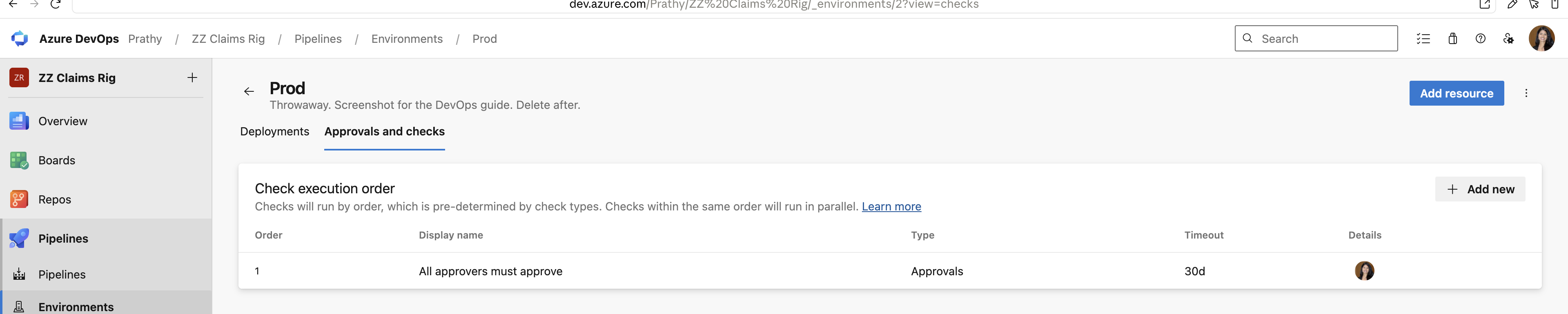
An environment in Azure DevOps is a target for a pipeline stage. Approvals attach to the environment, not to the pipeline file.
An approval in the pipeline file can be removed by whoever edits the pipeline. An approval on the environment cannot. Microsoft documents the mechanism under approvals and checks(opens in a new tab).
For this estate: three environments, no approval on Dev, none on Test, and one on Prod naming the approver rather than a group that contains the whole team.
The Azure side in the portal, or as code
The same applies on this side. Two of these have no CLI command and are REST or portal only.
| What | In the portal | As code | Note |
|---|---|---|---|
| Register an application | Entra, App registrations, New registration | az ad app create --display-name <name>, then az ad sp create --id <appId> | The second command is what creates the service principal. The first only defines the application |
| Create a secret | The registration, Certificates and secrets, New client secret | az ad app credential reset --id <appId> --append | Both print the secret once and never again. Without --append the command deletes every existing secret first |
| Create a repository | Azure DevOps, Repos, New repository | az repos create --name <name> | Needs the azure-devops extension, which is one install |
| Set a branch policy | Repos, Branches, the branch menu, Branch policies | az repos policy approver-count create | One command per policy, and each takes the repository and branch as arguments |
| Create a service connection | Project settings, Service connections, New, Azure Resource Manager | az devops service-endpoint azurerm create | The CLI takes the secret from AZURE_DEVOPS_EXT_AZURE_RM_SERVICE_PRINCIPAL_KEY, not a flag, and needs an Azure subscription to scope to |
| Create an environment and its approval | Pipelines, Environments, New environment, then Approvals and checks | Environments API, then POST .../_apis/pipelines/checks/configurations | Both work. The checks API is on a preview api-version and has no CLI command, and the approver id is an Azure DevOps identity rather than an Entra one |
The two permissions people confuse
The service principal needs a grant from each side, and having one without the other produces errors that never name the missing half.
The tenant setting lets it call the API at all. Without it, every call fails at authentication, whatever workspace it was aimed at. Workspace membership lets it write to a particular workspace. Without that, calls succeed and then report that the workspace does not exist, which sends people to check the workspace id for an afternoon.
So the principal is added as a member of all three workspaces, the same way a person would be. The tenant setting is granted once for the whole tenant. Workspace membership is granted once per workspace.
Two mechanisms, and why that is not a contradiction
The cross-cutting page says to pick one way of configuring per environment and stick to it. This setup uses two, and the split is by what a value is rather than by taste.
parameter.yml handles the things that are baked into an item definition at authoring time: the lakehouse a notebook attached to, the endpoint a model reads from. Those are substituted as the item is published, before anything runs. A variable library handles values the code reads while running, and its value set is chosen by the environment name the deploy was given, which is why the file is calledtest.json. Put a running value in the first, or a definition value in the second, and you have the mess the other page warns about.
The three files, line by line
Three files do the work, and none of them is long. What follows is what each one is for and which parts are decisions rather than boilerplate.
requirements.txt
Two lines, and the only interesting thing is the lower bound.
fabric-cicd>=1.3.0
azure-identity>=1.19.0
fabric-cicd is the library that reads a folder of Fabric item definitions and publishes them. Pin a lower bound rather than an exact version, so a fix arrives without a pull request, and raise it deliberately when a release changes behaviour. azure-identity is what turns the signed-in session into a token the library can use.
deploy_workspace.py
The whole script is one object and one call. Everything else is argument parsing.
target = FabricWorkspace(
    workspace_id=args.workspace_id,        # which workspace this run writes to
    environment=args.environment,          # picks the value set and parameter column
    repository_directory=str(ROOT),        # the folder holding the item definitions
    item_type_in_scope=args.item_types,    # nothing outside this list is touched
    token_credential=AzureCliCredential(), # whoever the step signed in as
)
publish_all_items(target)| What | What it does | Why it is a decision |
|---|---|---|
workspace_id | The workspace this run writes to | It comes from the variable group, so the same file deploys to three places |
environment | Names the environment: dev, test or prod | It picks which column of parameter.yml is used and which variable library value set is active. The value set file is called test.json because this argument says test |
repository_directory | The folder holding the item definitions | It is whatever folder git integration writes into, and it has to match the folder set in the workspace’s git connection |
item_type_in_scope | The item types this deploy may touch | Anything not named is left alone. A type missing here is the usual reason something never reaches production |
azure-pipelines.yml, and the variables
The pipeline is four stages of the same shape. What is worth understanding is where the values come from, because that is the part that is invisible in the file.
| Variable | Where it is defined | What it holds |
|---|---|---|
WORKSPACE_DEV, _TEST, _PROD | Variable group | The three workspace ids, printed by the provisioning script |
SP_CLIENT_ID, SP_TENANT_ID | Variable group | The principal and the tenant it signs in against. Neither is secret |
SP_CLIENT_SECRET | Variable group, marked secret | The one value that is. Marked secret, so it is masked in logs and has to be mapped into a step explicitly |
ITEM_TYPES | The pipeline file | Per pipeline rather than per estate, and the same for every stage, so it lives in the file where you can see it next to the stages |
$(NAME) is substituted by Azure DevOps before the script runs, so by the time bash sees the line the value is already in it. That is fine for a workspace id and wrong for a secret, which is why the secret is handled differently.
$(SP_CLIENT_SECRET) stops resolving in the script body. You have to pass it through env: and read it as an ordinary environment variable, which is why the step below has an env: block and the others do not.- script: |
az login --service-principal -u "$(SP_CLIENT_ID)" -p "$SP_SECRET" \
--tenant "$(SP_TENANT_ID)" --allow-no-subscriptions --output none
python -u .deploy/deploy_workspace.py \
--workspace-id "$(WORKSPACE_TEST)" --environment test \
--item-types $(ITEM_TYPES)
displayName: Deploy to Test
env:
SP_SECRET: $(SP_CLIENT_SECRET) # a secret has to be mapped in, not inlinedThe pipeline reads the group with - group: fabric-devops at the top, and every stage inherits it. A pipeline is not allowed to use a group until somebody authorises it, which is the permission step in the ordering above.
A release, end to end
Walk this through once before the first real release.
The change is small on purpose. The model gains a measure for killed or seriously injured casualties, and one of the three reports gains a card showing it.
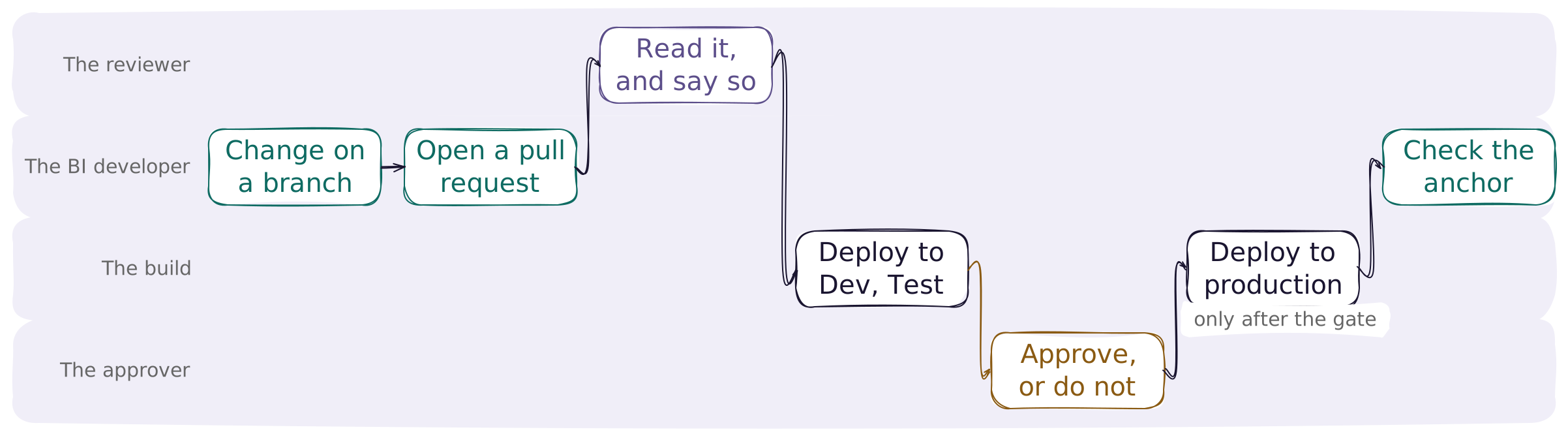
The developer changes the model on a branch and publishes it to their own workspace if they have one. They open a pull request and can no longer merge it, which is where the branch policy starts doing its job. From here the change needs a second person.
The reviewer reads it, properly for the model and as a sanity check for the report. The merge triggers the build, and the build writes to Dev, so the contents of Dev match main exactly. If somebody has been editing Dev by hand, their changes are overwritten here.
The same commit goes to Test, with different values substituted. It is the same commit, not a rebuild of the same source. The first time a commit reaches an environment, somebody also runs the data pipeline there, binds the model's connection to that environment's endpoint, and sets the refresh schedule and any row-level security membership. None of those travel with a deployment, in any pattern, and the cross-cutting checklist is the list to work through. The approver approves, or does not.
The build deploys to production and rebinds the reports, all three of them, because the binding lives in each report. Test with all three, not with one. Then somebody opens a report and checks a value. Every stage above can return green while serving the wrong environment's data.
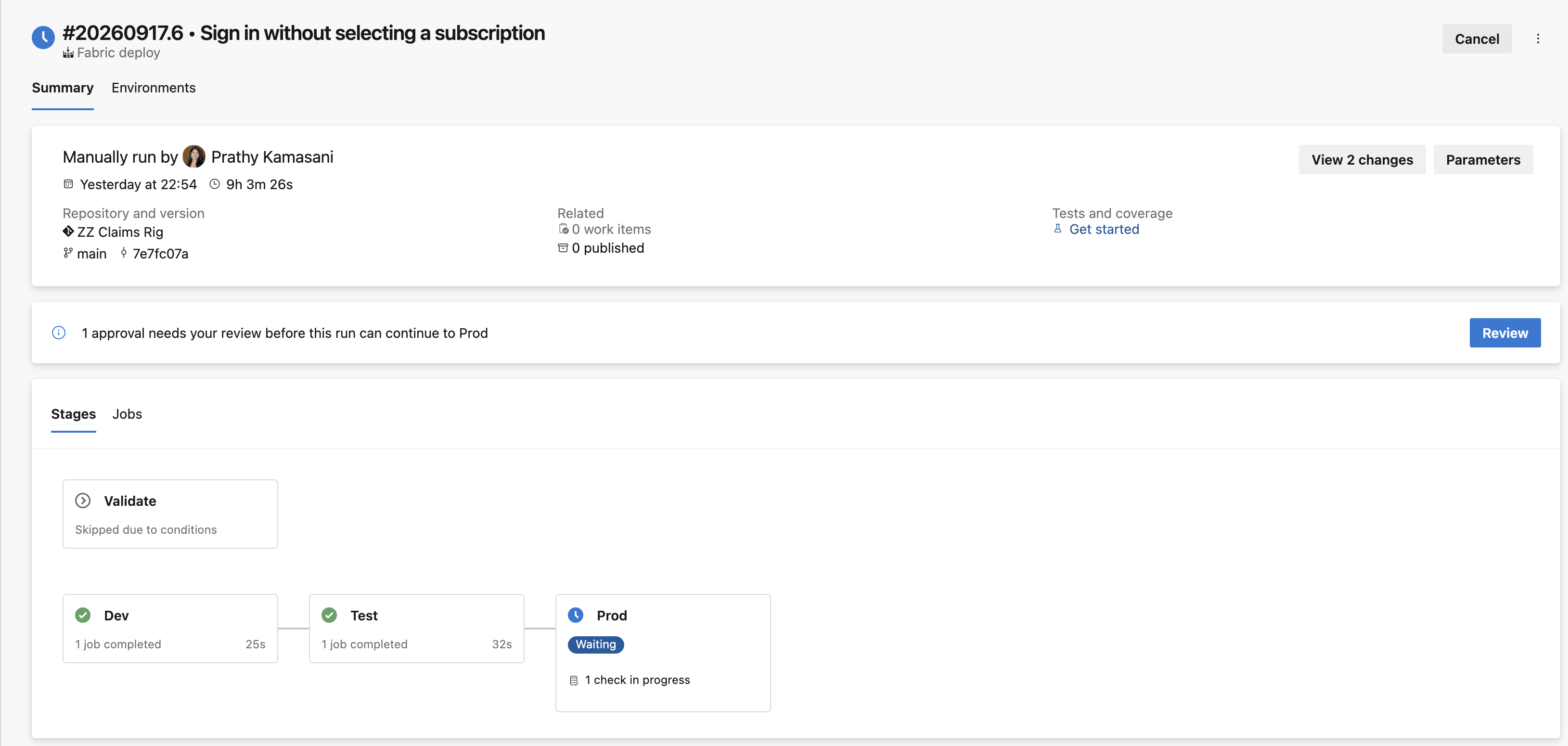
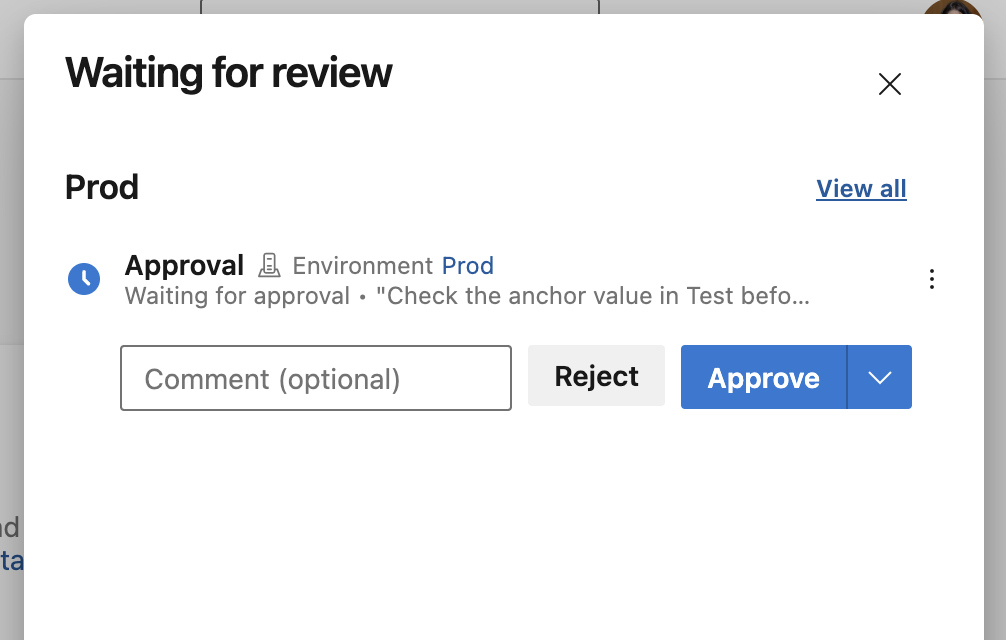
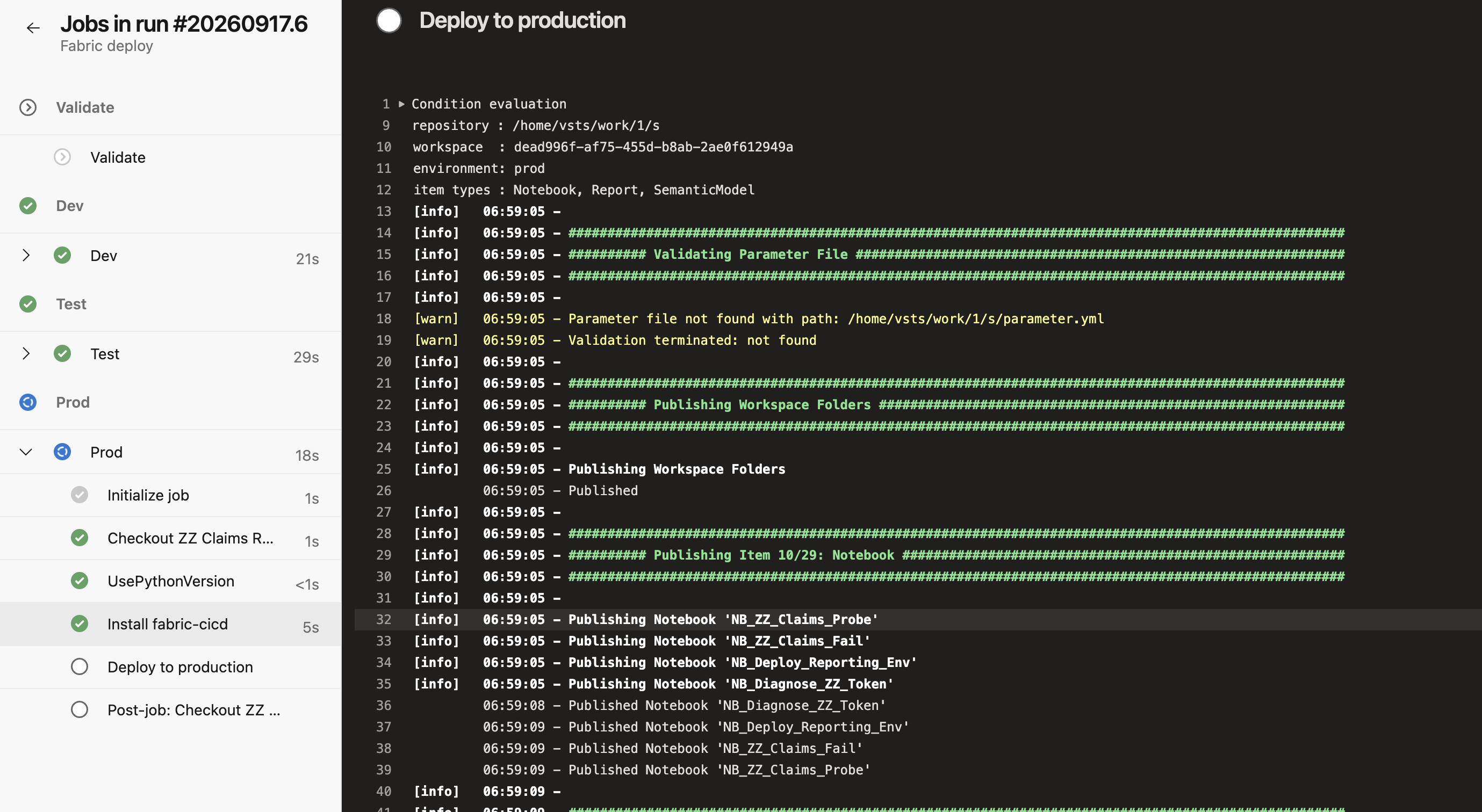
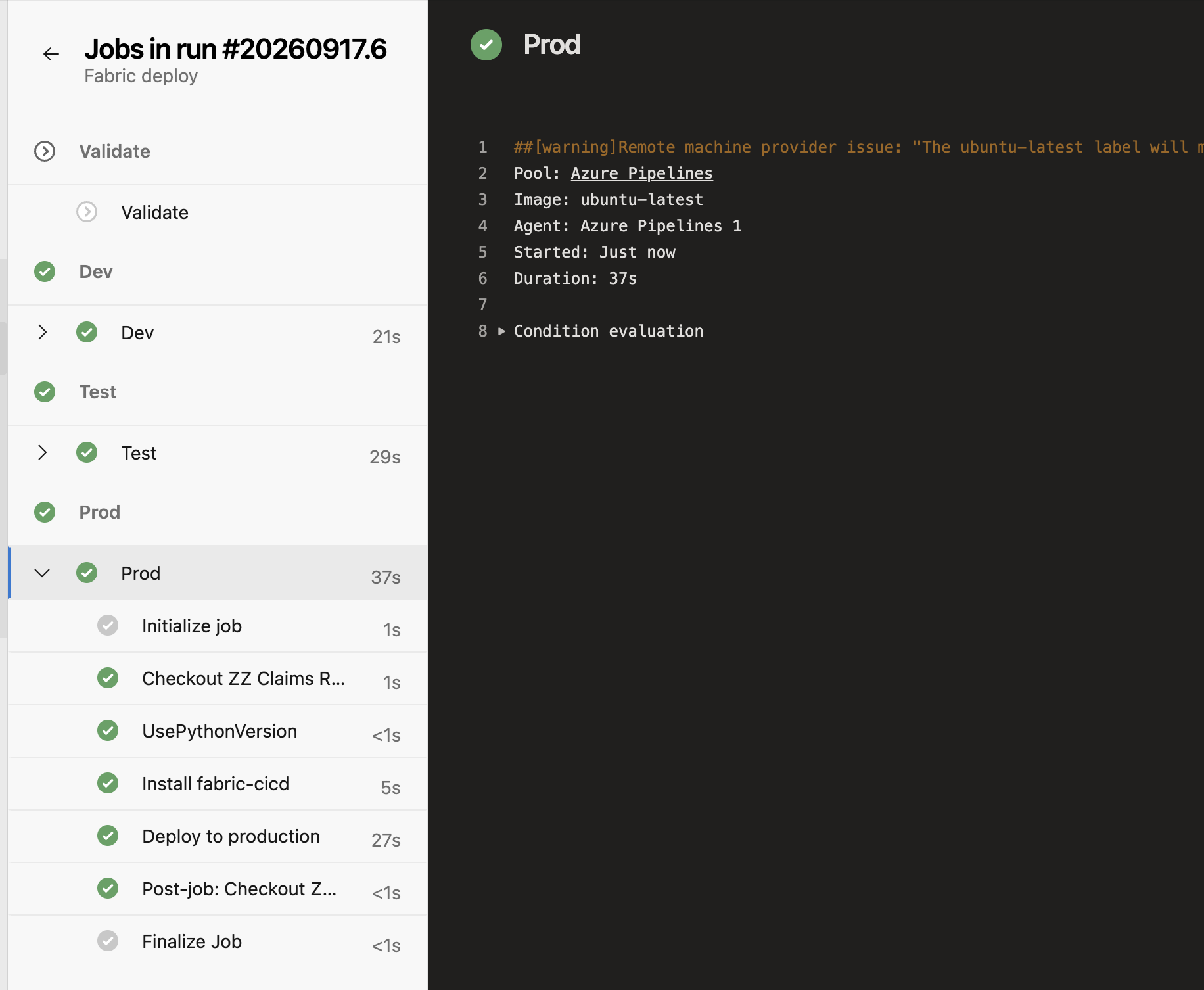
Here is that release happening: Test green and production waiting, the approver seeing the instruction the check was created with, the deploy naming each item as it publishes, and all three environments on the same commit.
| What you see | What it is | What fixes it |
|---|---|---|
| The build is green and production shows yesterday’s numbers | A report still bound to the model in the workspace it was authored against | Rebind the report to the target model, then check a value |
Workspace not found, and the workspace is right there | The principal has the tenant setting and no role in that workspace | Add it as a member of the workspace |
| The Git integration panel is missing from workspace settings | The tenant setting for git is off, or the group does not include you | Admin portal, not workspace settings |
| Everything works for a month, then authentication fails | The client secret expired | The reminder set the day it was created |
Three things that actually happen
The release above is the clean case. These three are what the week is really made of, and they take the same path with different amounts of it skipped.
A feature: a new measure and a new page
Branch out from Dev, which gives you a branch and a workspace. Add the measure to the model in Desktop, add the page to one report, publish to your own workspace and look at it. Commit both from Source control, open the pull request, and the reviewer reads the TMDL properly and checks that only the report you meant to touch has changed.
On merge it goes to Dev, then Test. Somebody opens the report in Test and looks at the new page against the anchor value, because that is the only step that catches a deployment which succeeded into the wrong place. Then the approver lets it into production, or does not.
A bug: the number is wrong in production
Reproduce it in Test first, not in production and not on your own machine. If Test has the same commit as production, and it does if nobody has deployed since, then a number that is right in Test and wrong in production is not a code problem at all. It is configuration, data, or a deployment that did not do what it said.
If Test is wrong too, it is the model. Branch out, fix, and take the ordinary path. The temptation is to fix it directly in the production workspace, and the reason not to is that the next deployment overwrites it and the bug comes back with no explanation.
Testing: what the pipeline can check and what it cannot
There is no unit test framework for a semantic model, so this is a shorter list than it would be for application code, and worth knowing exactly.
| Check | Where it runs | What it catches |
|---|---|---|
| The pull request build | On every pull request, before merge | A broken item definition, a parameter.yml that does not resolve, a file that is not valid JSON or TMDL |
| The deploy itself | Each stage | Anything the service rejects: a missing dependency, an item that cannot be created, a principal without the role it needs |
| Somebody opening the report | In Test, before the approval | Everything the machine cannot see. A measure that returns the wrong number is a correct deployment |
| The anchor value | After each deploy, in the target | A deployment that succeeded into the wrong environment. Every status above can be green while this is wrong |
The anchor check is the one to build first and the one teams skip. Everything above it tells you the deployment ran. Only a value tells you it ran against the right place.
Who owns what, once it is deployed
Every Fabric item has an owner, and it is not a label. The owner is the identity Fabric uses to reach that item's connections and credentials when nobody is watching. A lakehouse's SQL analytics endpoint runs as the lakehouse's owner. A refresh runs on the credentials the owner stored. So when that person leaves, orsimply does not sign in for ninety days, things stop working, and they stop at the next refresh rather than at the moment anything changed.
The good news about the setup in this guide is that it gets this right without being asked. The build creates the items in Test and production, so the service principal owns them, and a service principal does not leave, go on holiday or fail to sign in. That is worth knowing on purpose rather than by luck, because it is the single reason those two workspaces do not decay.
| How it arrived | Owner the first time | Owner after that |
|---|---|---|
| Created by the build, in git | The service principal owns it | Unchanged. A redeploy overwrites the definition, not the owner |
| Semantic model, deployment pipeline | Whoever ran the deployment owns it | Unchanged |
| Dataflow, deployment pipeline | Whoever ran the deployment owns it | Unchanged |
| Paginated report, deployment pipeline | Whoever ran the deployment owns it | Changes every time. The last person to deploy owns it |
Three things are never copied by a deployment, whichever mechanism you use: the refresh schedule, the data source credentials and role assignments. They belong to the target and they survive every release. That sounds like a gap and is actually the thing that makes this manageable: you set them once in Test and once in production, and no release undoes them.
Fixing it after the fact
This is where it gets awkward, and the awkwardness is the argument for the build owning things from the start.
| Item | How ownership moves | What to know |
|---|---|---|
| Lakehouse, Eventstream | The assign identity API | The only ownership change with an API. Takes a service principal or a managed identity, and carries to child items |
| Semantic model, report, dataflow | The item's own settings | The existing take over, unchanged. A person, never a service principal |
| Notebook, pipeline, warehouse and the rest | Item settings, About, Take over | One item at a time, by hand. A pipeline needs one more small edit and save afterwards or Last Modified By stays on whoever left |
| Mirrored databases | Nothing | Ownership cannot be changed at all. If the owner goes, the mirror is recreated |
To see where you stand before somebody's last day rather than after it, ask for the owner with the item itself: GET /v1/workspaces/{workspace}/items?include=defaultIdentity. Note that only lakehouses and eventstreams answer today, which is the same set the API can fix. Everything else still has to be read in the portal.
Watching it once it runs
The build tells you its own runs went green. It cannot tell you about anything that happened outside it, and that is usually the question being asked. Three questions, three different places, and none of them is the one place you would expect.
What went to production, and who allowed it
This one is free and already working. Azure DevOps keeps a deployment record per environment, and each entry carries the commit, the identity that deployed it and the approval that let it through. Open the production environment rather than the pipeline: the pipeline shows runs, the environment shows what is actually in the place. That is the answer to almost every audit question you will be asked, and nobody has to configure it.
Whether anything reached Fabric without going through the build
The uncomfortable one. A person editing a report directly in Test produces no pipeline event at all, because no pipeline ran. It shows up in Fabric, in the activity log, which records git and deployment operations by name alongside everything else.
| Operation | What happened | When it is worth a look |
|---|---|---|
CommitToGit | Somebody pushed a workspace change into a branch | Normal from a branch workspace. From Test or production it should not happen at all |
UpdateFromGit | A workspace pulled a branch in | Normal in Dev after a merge. Anywhere else, somebody bypassed the build |
BranchOutInGit | A branch workspace was created | How you see capacity being taken, and by whom |
SwitchBranchInGit | A workspace was repointed at another branch | The one that silently overwrites every item in the workspace |
UndoGit | Somebody threw away an uncommitted change | Usually harmless, occasionally the reason a day of work is missing |
ConnectToGit, DisconnectFromGit | A workspace joined or left source control | Disconnecting also destroys the branch workspace relationships |
DeployAlmPipeline | A deployment pipeline pushed to a stage | Only relevant if somebody is running the other mechanism alongside this one |
Whether the estate is still healthy
Refresh failures, capacity, items erroring: Fabric's own monitoring, not Azure DevOps'. Workspace monitoring is the current answer, and it is worth knowing exactly what it is before turning it on. It creates a read-only Eventhouse in the workspace, you query it with KQL or SQL, it keeps 30 days, and it bills to your capacity like any other Eventhouse.
The part to do before you need it
Azure DevOps has its own audit log, for changes to the setup rather than to the data: branch policy edits, permission changes, things being deleted. It is the record that answers who removed the approval. Three things about it are worth knowing on day one rather than on the day you need it.
- It is off by default. Nothing is being recorded until somebody turns it on in organisation settings, and it cannot be turned on retrospectively.
- It keeps 90 days, then deletes. Export, or stream it somewhere, if you need longer.
- It needs an Entra-backed organisation, and it is still in preview.
That is the whole practical point of this section. Both logs are short and one of them is not running. The question you will eventually be asked is about something that happened months ago, and the answer depends on a decision taken now.
Day two
Somebody joins. Add them to the group, and run the provisioning script if they need a workspace. That is the whole list.
Somebody leaves. Workspace roles and the build need nothing, if the groups and the service principal were done as above. Two things always need checking: a cloud connection bound with somebody's own identity dies with their account, and so does a refresh schedule set up under it. Both fail silently, at the next refresh rather than at the moment of the change.
Production breaks and needs a fix now. A hotfix takes the same path: branch, pull request, review, build, approve. Agree in advance which step may be skipped when it is urgent, and write it down. A hotfix is deployed quickly, to production, so the check at the end matters more here than anywhere else.
You want to rehearse a release. Run the deploy script locally with --dry-run, which resolves and transforms everything and writes nothing. That is also what the pull request build runs. To rehearse for real, point it at a fourth throwaway workspace rather than at Test, and keep the tenant guard the provisioning script uses, because the command line tool holds whichever tenant was last signed into.
A release has to be taken back. Not in production: nothing there remembers what it held last week, because it holds a copy of each item and the history lives in the repository. Going back a version means taking the commit you want and putting it through the same path. There is no undo button. Stopping a release before it goes out is much less work than reversing one.
What this does not solve
Six things a team runs into that nothing above fixes. They are here because finding them yourself, three months in, is worse than reading them now.
| The problem | Why the setup above does not solve it | What people do |
|---|---|---|
| Lakehouse and warehouse data does not deploy | Only definitions are in git. A deployed workspace has the tables and none of the rows | Run the data pipeline in each environment after the first deploy, or shortcut production data into Test read-only |
| Two people editing one report | A report is a folder of JSON. Git can merge it and the result is not a report anybody wants | One owner per report. If two people must, they take turns and say so |
| Deleting an item | A deploy publishes what is in the repository and leaves everything else alone, so a deleted item stays in the target forever | unpublish_all_orphan_items, which is a deliberate call and deletes things. Turn it on knowing that |
| The first environment has no values to substitute | parameter.yml needs the target’s ids, and the target does not exist until the first deploy creates it | Let fabric-cicd resolve item ids itself. Only list what it cannot know, such as a SQL endpoint |
| Nobody notices a broken scheduled refresh | Refresh schedules do not deploy, and a refresh that fails after a release fails quietly at 6am | Alerting on refresh failure, set up per environment, by hand, once |
| Someone edits the shared Dev workspace directly | Nothing prevents it. The next build overwrites them and the change disappears with no error | Take Contributor off Dev and leave the build as the only writer, once the team is used to branching out |
The solution this builds
Everything on this page is built out as a working solution: three notebooks, a data pipeline, a lakehouse, a warehouse of views, a variable library with a value set per environment, a parameter.yml, an Azure DevOps pipeline that validates on a pull request and deploys on a merge, and a script that provisions the three workspaces.
It runs on UK road safety collision data, published by the Department for Transport under the Open Government Licence. No key and no sign-up, so the whole thing can be run against your own tenant. Three files a year, joined on the collision reference, built into a star schema at one row per casualty.
fabric-devops-setup, and it holds the notebooks, the pipeline, the deploy scripts and the provisioning.Sources
Microsoft published the code from its Build 2025 session on this.
Read its pipeline for the authentication and the deploy script, and not for the branching. It triggers on a dev branch and a main branch, one workspace each, with no Test stage and no approval, which is the arrangement this guide argues against.
- The BRK205 reference implementation(opens in a new tab), with an Azure DevOps pipeline, a deploy script on
fabric-cicd, aparameter.ymland two Variable Libraries. - The session recording(opens in a new tab), which walks through the same material.
fabric-cicddocumentation(opens in a new tab). Link the latest build rather than a pinned version; the tool is on 1.x and older pinned pages are still served.